2025-12-31
AI Presentation Maker Pricing: True Cost Breakdown 2026
How hidden costs make cheap presentation automation expensive—and what to measure instead
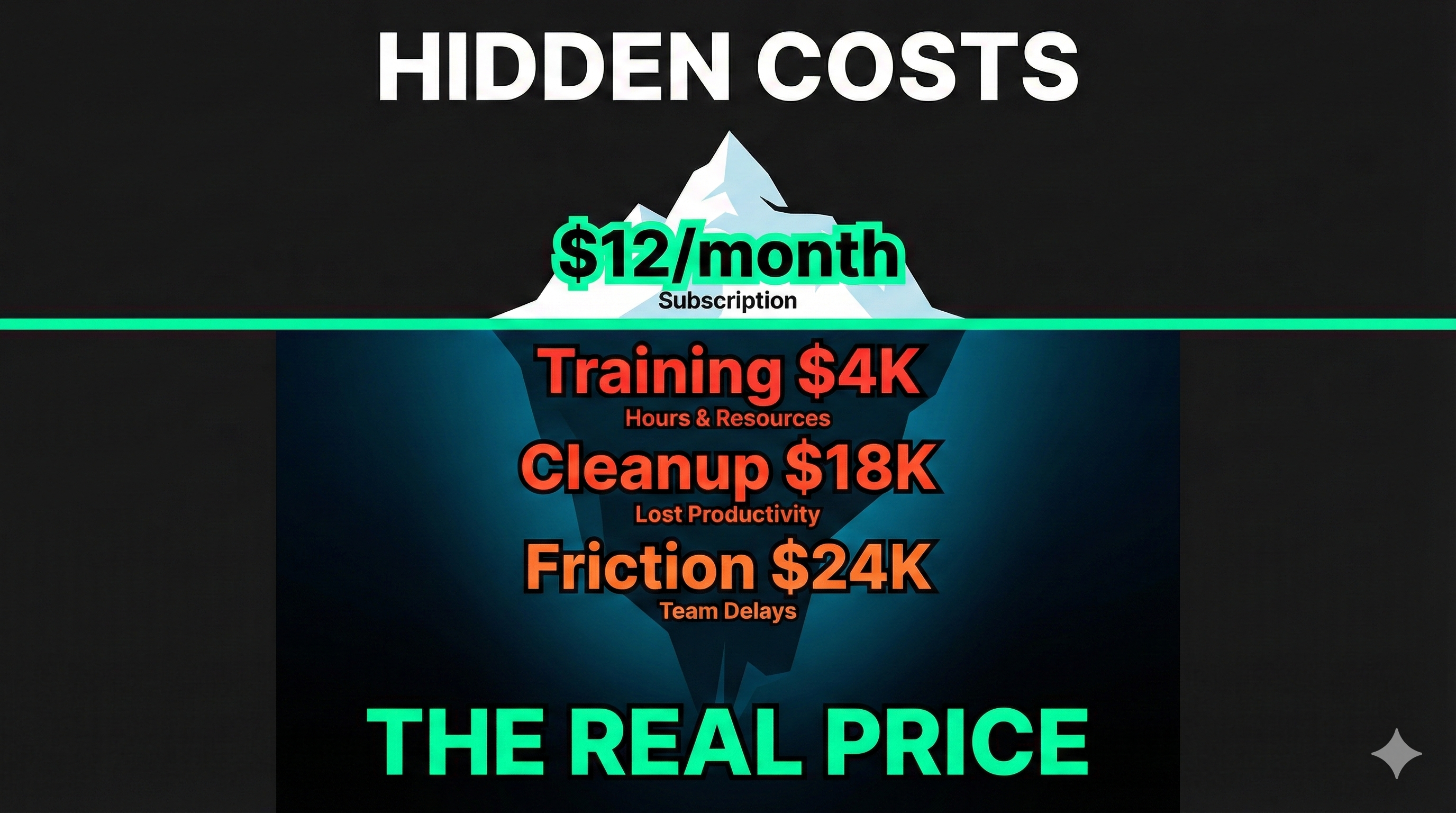
When comparing AI presentation maker pricing, Beautiful.ai’s $12 per month looks affordable — until you discover that team collaboration requires their $40 per user plan, a 233% price increase to unlock features most businesses actually need. Gamma’s team tier starts at $20 per user monthly. For a ten-person team, subscription costs range from $2,400 to $4,800 annually depending on the platform.
But subscription pricing tells only part of the story. Behind these published prices hide the real expenses: training time, export cleanup, collaboration friction, and workflow disruption that often cost more than the software itself.
Research on AI tool adoption reveals that while 90% of employees experiment with these technologies, only 8% use them daily in production workflows. When software sits unused despite subscriptions being paid, the cost per actual value delivered becomes infinite. Understanding total cost of ownership rather than comparing sticker prices determines which presentation automation investments actually save money.
For a broader comparison of AI presentation maker options and features, see our complete AI presentation maker guide.
The Subscription Price Mirage
Published pricing for presentation automation tools creates false expectations about actual costs. The numbers displayed prominently on pricing pages represent minimum commitments under ideal conditions—not what teams typically pay once they attempt productive use.
Beautiful.ai’s pricing structure demonstrates this clearly. The Pro plan at $12 monthly targets individual users but excludes team workspaces, brand management, and advanced collaboration. Most business users quickly discover they need the Team plan at $40 per user to access features like shared templates and brand controls. Detailed pricing analysis confirms this pattern: what looks affordable for individuals becomes expensive for teams.
Gamma takes a different approach with credit-based pricing starting around $20 monthly for team plans. But user reviews note that heavy brainstorming or revision cycles can deplete credits faster than anticipated, creating budget uncertainty when presentation volume determines spending.
These subscription models optimize for attractive pricing page numbers rather than transparent total costs. The best AI presentation maker for your budget isn’t the one with the lowest published price—it’s the one whose total cost of ownership remains lowest after accounting for all expenses.
Hidden Costs That Exceed Subscriptions
The largest expenses in presentation automation don’t appear in pricing tables. They show up in employee time spent on training, format cleanup, and workflow coordination—costs that typically dwarf software subscription fees.
Training investment represents the first hidden cost. Standalone platforms require learning new interfaces, mastering unfamiliar workflows, and developing new mental models for presentation creation. Calculate conservatively: if ten team members each invest four hours reaching basic proficiency at $100 per hour loaded cost, that’s $4,000 in training expenses before anyone creates their first useful presentation. And training isn’t one-time—platform updates, feature additions, and employee turnover create ongoing training overhead.
Export cleanup consumes time that should have been saved through automation. Testing documentation advises users to expect 45+ minutes of cleanup per presentation when exporting from standalone tools to PowerPoint. For teams creating 20 presentations monthly, that’s 15 hours of formatting repairs—nearly half a full-time employee’s capacity. At typical labor costs, this cleanup burden costs $1,500 monthly or $18,000 annually, far exceeding most subscription fees.
Collaboration friction creates costs harder to quantify but equally real. When some team members use the new platform while others work in PowerPoint, every collaboration point requires coordination overhead. Time spent explaining which tool to use, delays while people gain platform access, version control confusion across systems, and reduced engagement with unfamiliar sharing formats all consume productive hours. Even estimating conservatively at two hours monthly per team member, a ten-person team loses $2,000 monthly to collaboration friction.
Calculating What Actually Costs Money
Total cost of ownership requires adding subscription fees, training investment, export cleanup time, and collaboration friction. When you calculate these factors across twelve months for a typical team, the results often reverse the value hierarchy suggested by subscription pricing alone.
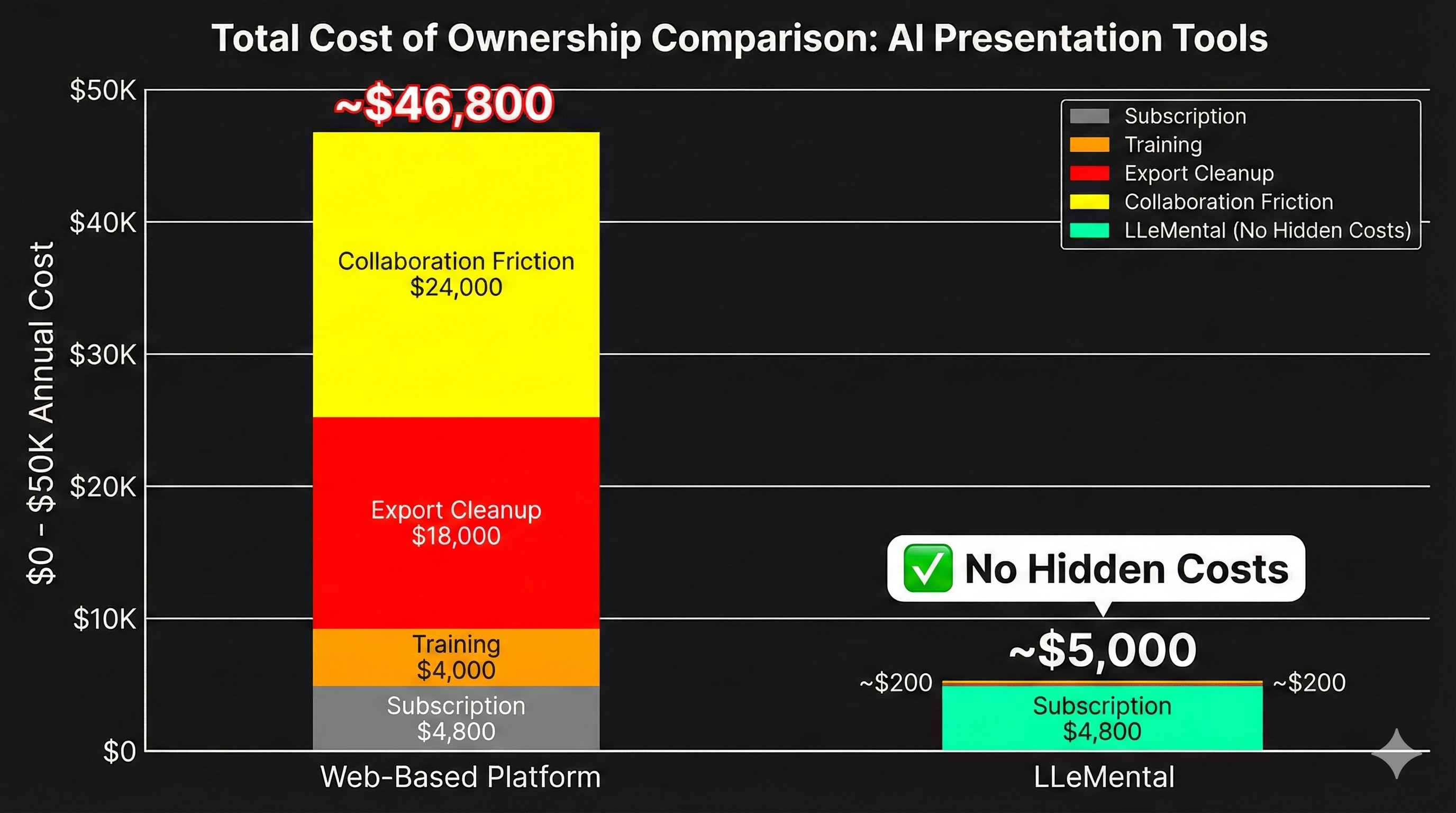
Consider a ten-person team evaluating options. A typical web-based platform at $40 per user costs $4,800 annually in subscriptions. Add $4,000 for initial training (10 people × 4 hours × $100/hour to learn the new platform), $18,000 annually for export cleanup (20 presentations/month × 45 minutes × $100/hour fixing formatting issues when exporting to PowerPoint), and $24,000 annually for collaboration friction (10 people × 2 hours/month × $100/hour coordinating across different platforms). Total first-year cost: $46,800.
Now consider template preservation automation working with native PowerPoint files. LLeMental Plus plan at $40 per user costs $4,800 annually in subscriptions—identical to the web platform. But training costs approach zero because teams continue using familiar PowerPoint. No export cleanup because presentations are native PowerPoint files. Minimal collaboration friction because everyone works in the same environment. Total first-year cost: approximately $5,000. The platform with identical subscription pricing delivers over $40,000 in annual savings by eliminating hidden costs.
For teams evaluating whether automation investments will deliver positive returns, our ROI calculator helps quantify actual savings when hidden costs are included versus excluded from analysis. The calculator demonstrates why subscription price comparisons mislead—total cost determines value, not sticker price.
The Real Numbers: Year One Comparison
Here’s what a 10-person team actually pays for presentation automation when you account for all costs:
Web-Based Platform Total: $46,800
- Subscription: $4,800 ($40/user/month)
- Training: $4,000 (4 hours per person at $100/hour learning new interface)
- Export cleanup: $18,000 (45 min per presentation fixing PowerPoint export issues, 20 presentations/month)
- Collaboration friction: $24,000 (2 hours per person per month coordinating across platforms)
LLeMental Total: $5,000
- Subscription: $4,800 ($40/user/month)
- Training: ~$0 (works with familiar PowerPoint)
- Export cleanup: ~$0 (native PowerPoint files)
- Collaboration friction: ~$200 (minimal learning curve)
Even with identical subscription pricing, web-based platforms cost nearly 10x more due to hidden operational expenses that template preservation eliminates.
What Gamma Users Actually Experience
Gamma markets itself as a fast, affordable AI presentation maker with free plans and low-cost paid tiers. But user experiences reveal gaps between marketing promises and practical reality. Recent reviews highlight consistent problems: customer service issues where multiple team members provide conflicting guidance, export quality problems where presentations open with formatting errors in PowerPoint, and billing irregularities including unexpected downgrades.
The export compatibility problem particularly impacts teams requiring PowerPoint deliverables. Extended testing confirms that when you export Gamma presentations to PowerPoint, fonts can be off, line spacing gets jumbled, and images resize awkwardly. For teams where presentations eventually need PowerPoint compatibility, this limitation transforms Gamma from time-saver to time-sink.
These practical limitations explain why many teams searching for a Gamma AI alternative prioritize PowerPoint compatibility and predictable costs over the lowest subscription price. The best presentation automation isn’t the cheapest—it’s the one that delivers time savings without hidden costs that exceed the subscription fee.
Making Smart Comparison Decisions
Evaluating the best AI presentation maker requires looking past marketing messaging to understand actual workflows and costs. Start by documenting your current presentation creation process. How many presentations does your team create monthly? What portion require PowerPoint compatibility? How much time do reviews and approvals currently consume? What does your team’s loaded labor cost per hour?
These baseline metrics let you calculate actual savings potential. If your team creates 20 presentations monthly and each currently takes three hours, that’s 60 hours monthly. If automation reduces creation time to 30 minutes but adds 45 minutes of export cleanup, you’re saving 1.75 hours per presentation—not 2.5 hours. At $100 per hour, actual monthly savings are $3,500, not $5,000. Knowing real savings helps you determine which subscription costs represent good value versus which exceed the benefits delivered.
Also evaluate adoption risk. The platform with the best features means nothing if your team doesn’t use it productively. Tools requiring significant learning investment face higher adoption failure rates. Tools that disrupt established workflows encounter resistance regardless of capabilities. Tools that work with familiar software see faster adoption because they make jobs easier rather than different. Our comprehensive guide to selecting business presentation tools examines these adoption factors in depth.
The comparison process should prioritize total value delivered over subscription price minimization. A platform costing $40 per user that teams use productively delivers better ROI than a platform costing $10 per user that creates more problems than it solves.
Why Template Preservation Changes the Math
Template preservation technology reverses the typical cost structure by eliminating hidden expenses rather than just offering competitive subscription pricing. When AI works with your existing PowerPoint templates instead of forcing migration to new platforms, the cost factors change fundamentally.
Training costs drop to near zero because teams continue using PowerPoint—software they already know. No interface learning required, no workflow adaptation needed, no productivity dip during transition periods. The time and money typically spent on training simply doesn’t get spent.
Export cleanup disappears entirely because presentations are native PowerPoint files from creation through delivery. There’s no export step to break formatting, no translation layer introducing errors, no cleanup phase consuming saved time. The presentation works correctly the first time because it never left PowerPoint format.
Collaboration friction vanishes when everyone works in familiar environments using standard file formats. No platform coordination needed, no version control confusion, no reduced engagement with unfamiliar systems. The collaboration patterns that already work continue working, just with faster content generation.
These eliminated costs typically exceed subscription fees by factors of three to five. When a platform’s total cost of ownership comes primarily from its subscription price rather than hidden operational expenses, the value equation changes dramatically. Higher subscription fees become justified when they eliminate costs that would otherwise exceed those fees.
Choose Based on Total Cost, Not Sticker Price
The best AI presentation maker isn’t determined by lowest subscription cost—it’s determined by highest value delivered after accounting for all expenses. Platforms with attractive pricing pages often create hidden costs that exceed their subscription fees. Platforms with higher published prices frequently deliver better value by eliminating the operational expenses that make cheap tools expensive.
Calculate your team’s actual costs including training time, cleanup overhead, and collaboration friction. Factor in adoption risk—unused software costs infinitely more per value delivered than actively used software at any price. Consider whether you’re optimizing for procurement approval or actual productivity gains.
The platforms that survive long-term aren’t the cheapest—they’re the ones teams actually use productively because they integrate with existing workflows rather than disrupting them.
Experience Transparent Pricing and Real Savings
Try LLeMental with straightforward pricing and no hidden costs from training or cleanup. Work directly with your existing PowerPoint templates, eliminate learning curves, and skip export repairs entirely.
Try LLeMental free — 50,000 AI credits included, no credit card required — and calculate your actual savings using our ROI calculator. Upload templates you already use, optionally add instructions, and generate presentations without the hidden costs that make cheap alternatives expensive. No credit card required, no budget surprises, just predictable automation costs that actually deliver savings.