2026-01-25
Best AI Presentation Makers of 2026: 10 Tools Ranked
An in depth look at every major AI presentation tool to find which actually work for professional teams
Updated 1/26/26
The AI presentation maker landscape in 2026 is crowded, competitive, and confusing. More than 50 tools claim to “revolutionize” how you create presentations, but most deliver the same basic functionality: you type a prompt, the AI generates generic slides, and you spend the next hour fixing formatting issues and rebuilding content.
Recent Harvard Business Review research highlights why most organizations struggle with AI implementation—95% of generative AI pilots fail to deliver meaningful returns, primarily due to organizational barriers rather than technical limitations. This disconnect between AI hype and practical value makes tool selection critical.
We tested the top 10 AI presentation makers that actually matter for professional teams—not obscure tools with three users, but platforms with real market adoption, active development, and proven business results. We evaluated generation quality, design capabilities, PowerPoint compatibility, team collaboration features, and most importantly: which tools actually save time versus creating new problems.
This isn’t another listicle copying features from marketing sites. We generated real presentations, tested export quality, measured time savings, and identified which tools work for specific use cases versus generic “best for everyone” claims that help nobody make actual decisions.
For comprehensive understanding of the technology powering these tools, explore our complete AI presentation generator technology guide that explains how different approaches to presentation automation create vastly different user experiences.
What Actually Makes the Best AI Presentation Maker
Before diving into specific tools, understanding evaluation criteria helps you identify which features matter for your workflow versus marketing hype that looks impressive in demos but fails in production.
Template Compatibility: The Feature Nobody Talks About
Most AI presentation makers force you to abandon existing PowerPoint templates and rebuild everything in their proprietary systems. This “template tax” costs organizations $15,000-$40,000 in designer time plus 2-3 months implementation delay—expenses that reviews conveniently ignore when comparing “$10/month” subscription prices.
The best AI presentation makers work with your existing files, preserving years of brand development investment rather than forcing expensive migration. For detailed analysis of why this matters, see our comprehensive guide on AI presentation tools that work WITH your templates instead of against them.
PowerPoint Export Quality: Where Most Tools Fail
“Exports to PowerPoint” sounds like a binary feature—either it works or doesn’t. Reality is messier and more expensive. Standalone web platforms create presentations optimized for browser display, then translate to PowerPoint during export. Critical elements break consistently: fonts substitute to defaults, layouts shift causing text overlap, colors approximate rather than match exactly, animations disappear. For detailed analysis of why some tools produce perfect exports while others create formatting disasters, see our comprehensive guide to PowerPoint export quality in AI presentation makers.
Independent testing by Plus AI confirms that standalone AI presentation tools consistently produce formatting issues when exported to PowerPoint, requiring 45-90 minutes of manual cleanup per presentation. For teams creating 10+ presentations monthly, export cleanup time exceeds the time AI supposedly saves.
Our detailed analysis of PowerPoint export quality explains why some tools produce perfect exports while others create formatting disasters—and how to predict which category a tool falls into before committing.
Real Business Workflow Integration
Generic comparison articles test tools with simple prompts: “Create a presentation about digital marketing strategy.” Real business presentations require processing meeting notes, client research, spreadsheet data, competitive analysis PDFs, and website content—then synthesizing information into cohesive narratives that match your methodology frameworks and proven structures.
To see exactly how multi-source data processing works in practice, explore our demonstration of transforming multiple documents into professional presentations with real business examples.
Tools handling only text prompts work for academic presentations or internal team updates. Professional proposals, client deliverables, board presentations, and investor pitch decks require multi-source data integration that most AI presentation makers don’t support.
Team Collaboration That Actually Works
“Collaboration features” encompasses everything from basic slide commenting to comprehensive review workflows with approval gates and version control. Standalone web platforms excel at real-time co-editing but create friction when presentations must move to PowerPoint for executive review or client distribution. Native PowerPoint tools integrate seamlessly with existing workflows but lack advanced collaboration features.
The best approach depends entirely on your team’s reality: primarily edit in web interfaces with occasional PowerPoint exports, or primarily work in PowerPoint with occasional AI assistance?
The 10 Best AI Presentation Makers (Tested & Ranked)
1. LLeMental: Best for Template Preservation & Business Documents
Why LLeMental Ranks First
LLeMental solves the fundamental problem every other AI presentation maker ignores: how to add AI capabilities to existing PowerPoint templates without forcing expensive template migration. Rather than rebuilding your presentation formats in proprietary systems, LLeMental works directly with your .pptx files—analyzing your template and generating content directly within it while preserving formatting, branding, and layout.
This template preservation approach delivers value other tools structurally cannot: zero migration costs, immediate implementation, perfect brand compliance, and native PowerPoint compatibility without export issues. For organizations with established presentation investments, LLeMental is the only option that enhances existing assets rather than forcing abandonment.
How It Actually Works
Upload your current PowerPoint template—the one your team already uses with approved branding, proven layouts, and tested structures. LLeMental works directly within your template, preserving all existing elements like logos, layouts, and formatting while generating new content tailored to each client or project (names, project descriptions, recommendations, data analysis).
The platform works directly within your template, generating content while preserving all formatting, branding, and layout. For users who want more control, optional instructions let you guide tone, style, or content strategy across the document. Templates are saved to your library and can be reused immediately, ensuring consistent output every time.
When generating presentations, LLeMental processes multiple source formats simultaneously—PDFs, Word documents (DOCX), text files (TXT), and meeting notes—synthesizing information into cohesive narratives that populate your slides while preserving your template structure. (Excel/CSV and live website URLs coming soon.) All formatting and design elements remain untouched. The output is a native .pptx file with perfect formatting, exact brand colors, proper fonts, and working animations.
Real Business Impact
A digital marketing agency reduced client proposal creation from 4 hours to 5 minutes per project while maintaining brand standards tested across 200+ client presentations. The 98% time reduction translated to $38,000 annual labor savings with zero template migration costs since they used existing files immediately. For detailed analysis of this implementation, see our complete AI proposal tools for marketing agencies case study.
A financial services firm generating investment proposals discovered LLeMental’s multi-source processing—combining company research from PDFs and client preferences from meeting notes—produced more comprehensive proposals than manual creation while ensuring regulatory disclaimers remained exactly as legal approved.
Best For: Organizations with existing PowerPoint templates, marketing agencies creating repetitive proposals, consulting firms with methodology frameworks, financial services requiring compliance-approved formats, sales teams using proven pitch decks, any business where template preservation matters more than starting from scratch.
Bottom Line: If you or your team have a template that gets adjusted for every client or project, requiring consistent output, LLeMental was made for you.
Limitations: Less suitable for users wanting to explore new design aesthetics, or for one-off presentation creation where template reuse and consistency doesn’t matter.
Pricing: User plan $20/month (500K credits/month, 5 templates), Plus plan $40/month per user (unlimited templates, 2M credits/month), Business custom pricing with API access and dedicated support.
For comprehensive understanding of how template preservation technology works and why it matters, explore our detailed guide to AI PowerPoint automation with template preservation.
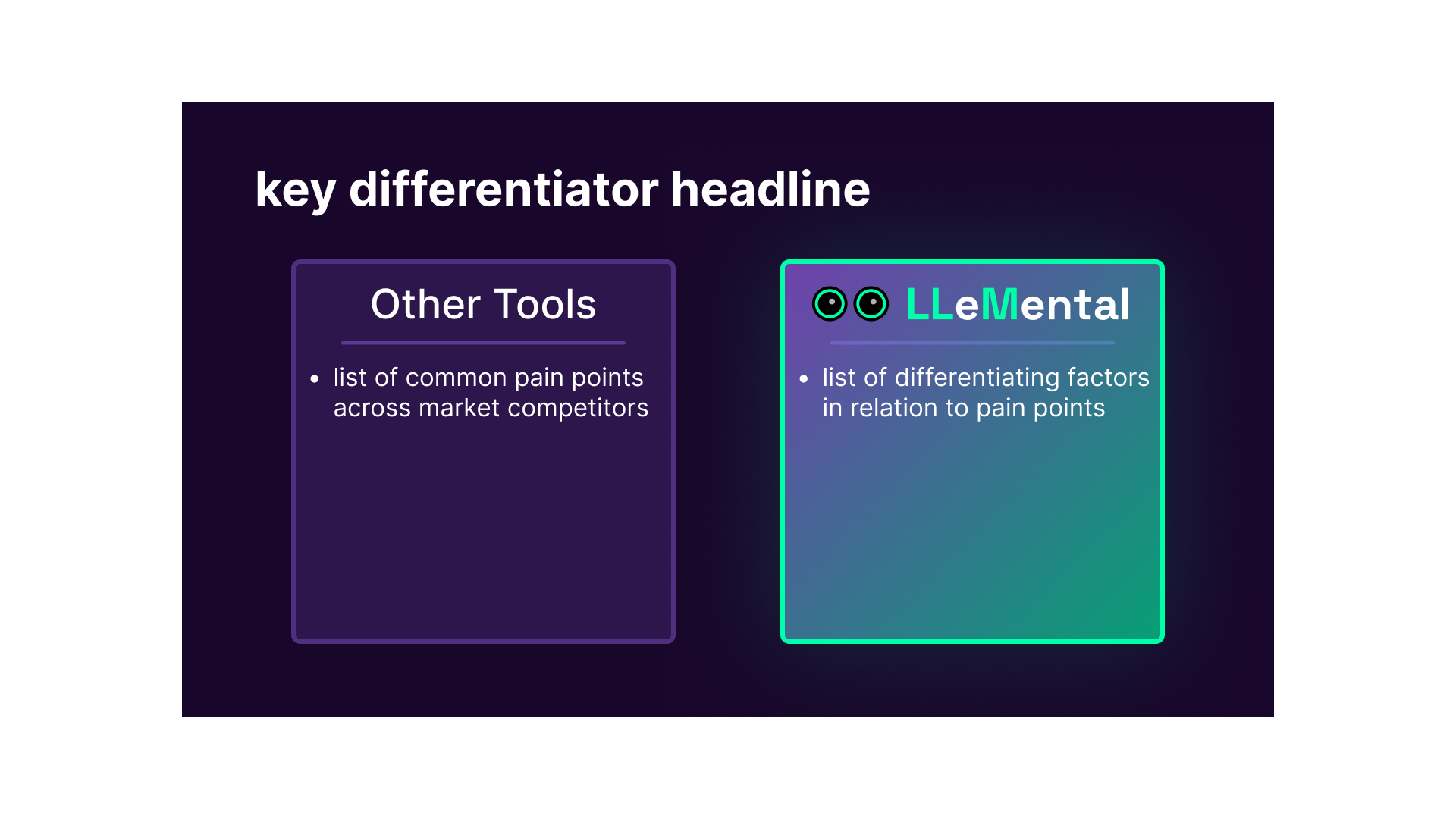
Template Uploaded to LLeMental
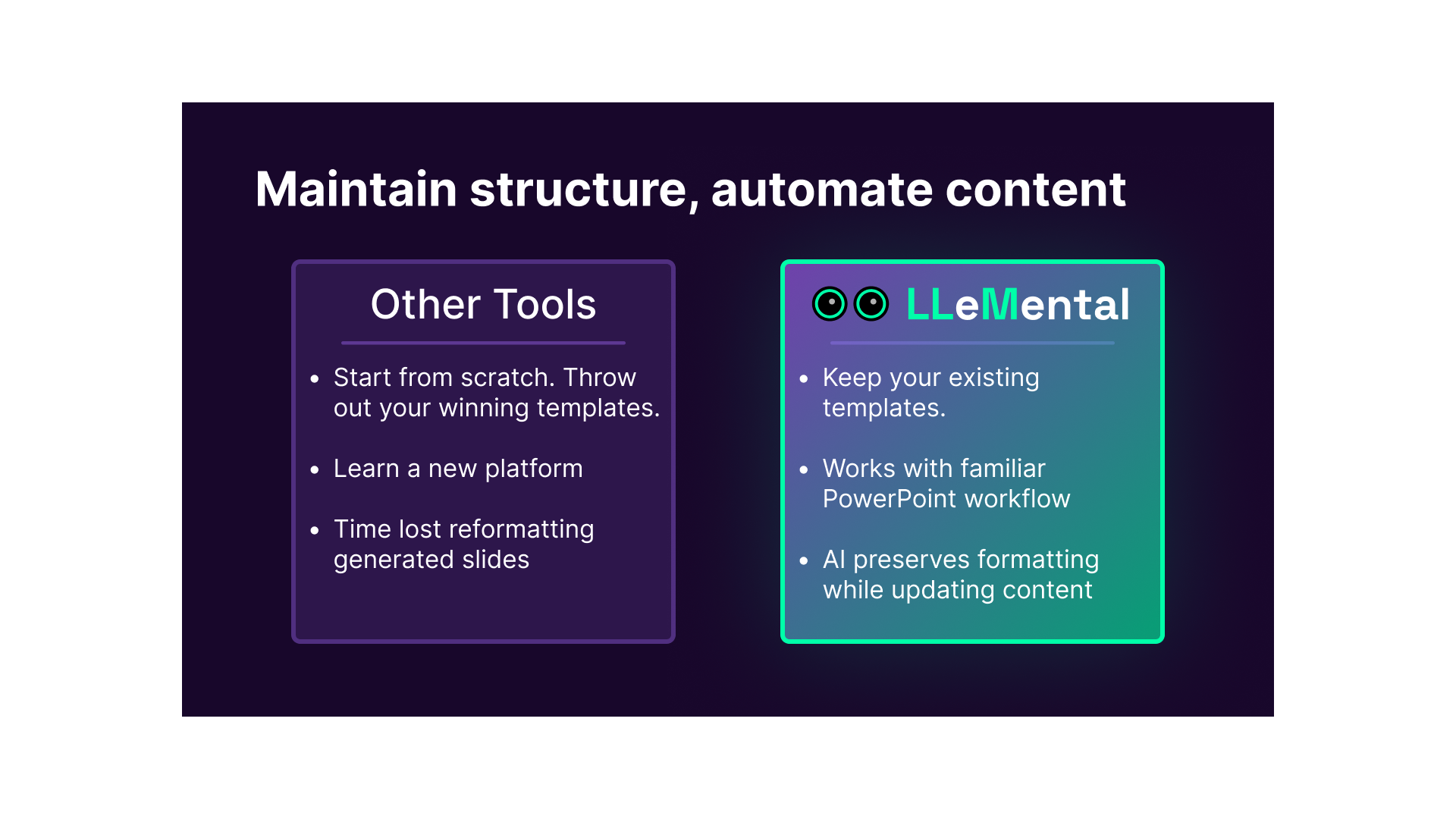
After Generating with LLeMental
2. Gamma: Best for Modern Web-Style Presentations
What Makes Gamma Popular
Gamma has earned market-leading position through card-based presentation formats that reimagine how slide decks work. Rather than forcing content into rigid slide containers, Gamma uses flexible cards that adapt to content naturally—creating presentations that feel more like interactive websites than traditional PowerPoint decks.
The platform’s AI generates visually striking presentations with minimal input, making it exceptionally fast for creating one-off presentations or internal team updates where design aesthetics matter more than brand compliance or output consistency.
The Template Preservation Problem
Gamma uses proprietary card-based architecture fundamentally different from PowerPoint’s slide model. Your existing PowerPoint templates cannot be imported or preserved—using Gamma means rebuilding presentation formats entirely within Gamma’s design system.
This isn’t a minor limitation. Organizations with years of template investment face complete format migration. Proven layouts, tested structures, and approved designs must be recreated in Gamma’s card system or abandoned. For businesses with established brand standards or compliance requirements, this migration cost often exceeds any efficiency gains AI delivers.
PowerPoint Export Reality
Gamma offers PowerPoint export but the conversion consistently breaks formatting. Gamma’s own documentation acknowledges that gradient headings may render differently or default to single colors in exports, and fonts may not appear as expected unless installed locally.
Extended testing reveals more extensive issues: text boxes shift position, custom fonts substitute to defaults, colors approximate rather than match exactly, animations either disappear or require recreation. A 15-slide presentation generated in 90 seconds requires 45-60 minutes of PowerPoint cleanup—negating the time savings AI supposedly delivered.
When Gamma Works Exceptionally Well
If template preservation isn’t required, Gamma delivers genuine value. The card-based format creates modern, visually striking presentations that feel fresh compared to traditional slides. AI-powered content generation produces coherent narratives quickly. Collaborative features enable efficient team editing.
Startups without established templates, marketing teams building one-off presentations, internal team updates shared via web links—these use cases play to Gamma’s strengths while avoiding its PowerPoint compatibility limitations.
Best For: Teams starting from scratch with no existing templates, presentations primarily shared via web links rather than PowerPoint files, users preferring modern card-based formats over traditional slides, startups and agencies comfortable adopting new presentation paradigms.
Limitations: Cannot preserve existing PowerPoint templates, export to PowerPoint breaks formatting consistently, forces complete template migration for established organizations, limited PowerPoint compatibility creates friction with clients expecting .pptx files, card-based interface has learning curve that slows initial adoption, customer service inconsistencies reported by users with conflicting guidance from different team members (see Trustpilot reviews).
Pricing: Free plan available with basic features, Plus plan $10/month per user, Pro plan $20/month per user with advanced capabilities and team features.
For organizations evaluating whether Gamma’s limitations outweigh its strengths, our comprehensive Gamma alternative comparison examines which tools better serve PowerPoint-centric workflows.
3. Beautiful.ai: Best for Smart Template Automation
The Smart Slide Innovation
Beautiful.ai pioneered intelligent template systems that automatically adjust layouts as content changes—innovative automation that maintains visual balance without manual formatting. Add a bullet point and the slide automatically adjusts spacing. Remove an image and text reflows naturally. This “smart slide” technology delivers what traditional templates promise but rarely achieve: consistent professional results regardless of content volume.
The platform’s AI generates presentations using these smart templates, creating outputs that look polished immediately rather than requiring extensive design cleanup.
The Migration Requirement
Beautiful.ai requires using their template system—you cannot import existing PowerPoint templates. Organizations with established presentation formats must recreate layouts, approximate brand colors and fonts within Beautiful.ai’s available options, and adapt proven structures to fit smart slide constraints.
The platform offers brand kit functionality where you specify company colors and fonts, but this applies only to Beautiful.ai’s templates, not your existing PowerPoint files. You’re rebuilding templates from scratch, just with some brand consistency guardrails.
PowerPoint Export Experience
Exports to PowerPoint maintain better fidelity than some competitors, but manual cleanup remains necessary. Smart slide features that work beautifully in Beautiful.ai—automated spacing, dynamic layouts, intelligent element positioning—translate poorly to PowerPoint’s static slide structure.
Fonts may substitute if your brand uses typefaces not in Beautiful.ai’s library. Layouts that adapted automatically in Beautiful.ai become fixed in PowerPoint, losing the intelligent adjustment that made them effective. Color matching approximates rather than preserves exact Pantone codes.
When Beautiful.ai Excels
Organizations willing to adopt Beautiful.ai as their primary presentation platform and accept the template migration investment may benefit from design automation. Teams creating multiple presentations weekly may see efficiency gains from automated layout optimization only after templates are rebuilt.
The smart slide technology particularly benefits users without design expertise—the platform prevents common layout mistakes that plague manually formatted presentations.
Best For: Organizations willing to migrate to Beautiful.ai’s template system, teams prioritizing automated design intelligence over template preservation, users creating presentations primarily within Beautiful.ai rather than distributing PowerPoint files.
Limitations: Cannot preserve existing PowerPoint templates, requires complete template rebuild, export cleanup needed for PowerPoint compatibility, significantly higher price point at $40/month per user for team features, smart slide automation sometimes fights against user intent when making specific layout choices, learning curve for understanding which template types work best for different content.
Pricing: Pro plan $12/month per user, Team plan $40/month per user with collaboration features and advanced brand controls.
4. Plus AI: Best for Native PowerPoint Integration
The Add-In Advantage
Plus AI operates as a Google Slides and PowerPoint add-in, giving it native integration advantages standalone platforms structurally cannot match. The tool works inside the presentation software you already use, generating content directly in PowerPoint or Google Slides rather than creating presentations in external systems that require export.
This architecture delivers immediate benefits: zero learning curve for familiar interfaces, perfect compatibility since content generates natively, seamless integration with existing workflows and review processes.
How It Handles Templates
Plus AI can work with existing PowerPoint files since it operates as an add-in within PowerPoint itself. However, the tool doesn’t preserve templates as-is. Instead, it analyzes content and applies its own AI-generated design and layout choices, effectively redesigning slides even while working within your PowerPoint file.
Brand colors and fonts remain (because they’re PowerPoint native), but layouts, spacing, element positioning, and content organization may change substantially. Static sections you need to preserve—legal disclaimers, specific footer content, pre-approved messaging—can be altered unless manually protected.
Multi-Source Data Limitations
Plus AI operates primarily as a slide editing assistant. Users are able to generate complete decks from scratch by inputting text or one supporting file, but it lacks the multi-source synthesis that competitors like LLeMental offer. While you can paste text into the add-in or ask it to generate content for specific slides, it doesn’t process multiple data sources simultaneously. You cannot upload meeting notes PDFs, client research documents, and spreadsheet data expecting Plus AI to synthesize everything into a cohesive presentation. Instead, the workflow resembles Microsoft Copilot: work through your presentation section by section, prompting AI to generate or improve individual slides rather than creating entire presentations from diverse source materials. For teams needing to combine discovery call transcripts, competitive research, client data, and strategic frameworks into unified proposals, Plus AI’s approach may be limiting.
Export Quality Perfection
Since Plus AI works within PowerPoint and generates actual PowerPoint slides rather than converting from another format, export quality issues disappear entirely. The file is already a PowerPoint file with native formatting, properly embedded fonts, and working features. This represents Plus AI’s strongest differentiator from standalone platforms—you never face formatting cleanup because you never left PowerPoint’s ecosystem.
The Template Preservation Gap
While Plus AI works with PowerPoint files, it doesn’t preserve templates in the sense established organizations require. Proven layouts get redesigned via the ‘remix’ feature. Tested structures can get reorganized. Static content risks modification unless manually protected.
For organizations with templates that must maintain exact formatting—regulatory requirements, brand compliance, proven conversion structures—Plus AI’s redesign approach creates similar problems to complete platform migration, just within PowerPoint’s interface rather than external platforms.
Best For: PowerPoint users wanting AI assistance but accepting template redesign, teams without strict brand consistency requirements, organizations comfortable with AI determining layout and design choices, users prioritizing PowerPoint compatibility over template preservation.
Limitations: Works in PowerPoint but doesn’t preserve exact templates, redesigns layouts and structures, static content may be altered, section-by-section workflow is time-consuming for long presentations, cannot process multiple source documents simultaneously, requires expensive Microsoft 365 Copilot subscription ($30/month additional) for advanced features, limited automation compared to standalone platforms.
Pricing: Free plan available with limited features, Pro plan $20/month per user with advanced AI capabilities and priority support.
5. Canva Magic Design: Best for Design Flexibility
The Canva Ecosystem Advantage
Canva dominates general design tools through an enormous asset library (millions of templates, photos, graphics, fonts), powerful editing capabilities, and broad platform recognition. Magic Design adds AI presentation generation to Canva’s comprehensive design ecosystem, enabling users to create presentations leveraging Canva’s vast resources.
For organizations already using Canva for marketing materials, social media graphics, and other visual content, adding presentation creation to the same platform creates workflow efficiency and design consistency across all visual communication.
Side Note: Canva could be used in tandem with a tool like LLeMental. Example: You find a Canva template you really like and download it. After making any corrections to the template or structure, upload it to LLeMental with your meeting notes to generate the final presentation. Now you’ve found a way to source beautiful templates and generate professional presentations.
The Maximum Migration Cost
Using Canva for PowerPoint presentations means rebuilding everything in Canva’s platform. Existing templates refined over years must be recreated from scratch using Canva’s elements, layouts, and design tools. For organizations with complex branded templates—specific typography hierarchies, precise color systems, custom graphics, regulatory disclosures, tested layouts—the rebuild project becomes substantial.
Canva’s strength is design flexibility, which means nearly infinite options for recreation. This same flexibility means significant designer time investment to accurately rebuild templates rather than simple format conversion.
Brand Kit vs Template Preservation
Canva offers brand kit functionality where you upload logos, specify colors, and define fonts. This helps maintain consistency when creating new designs in Canva, but it doesn’t preserve existing PowerPoint templates. You’re still rebuilding presentations in Canva’s system, just with brand elements accessible.
PowerPoint Export Challenge
Independent testing found that Canva presentations exported to PowerPoint require significant cleanup work—text boxes shift, formatting changes, and layouts require manual correction. A professionally designed presentation in Canva becomes a formatting repair project when exported to PowerPoint.
When Canva Makes Sense
Organizations adopting Canva as their primary design platform across all visual communication—not just presentations—may justify the migration investment. Teams needing extensive design customization and editing capabilities benefit from Canva’s powerful tools once templates are rebuilt.
The platform particularly suits marketing teams creating diverse visual content types where presentation generation represents one capability among many rather than the primary use case.
Best For: Organizations adopting Canva for comprehensive design needs beyond presentations, teams with substantial design resources for template migration, users prioritizing maximum design flexibility over preservation, marketing departments managing diverse visual content.
Limitations: Highest template migration cost among tools reviewed, export quality issues with PowerPoint, requires complete template rebuild in proprietary platform, overwhelming feature set creates steep learning curve for presentation-specific use, Magic Design presentations often require significant manual design refinement, collaboration features require Teams plan upgrade.
Pricing: Canva Pro $12.99/month per user includes Magic Design features, Canva for Teams $30/month per user for 5+ members with enhanced collaboration and brand management.
6. Pitch: Best for Team Collaboration
Collaboration-First Design
Pitch has built its platform around real-time team collaboration, delivering co-editing capabilities, robust commenting systems, comprehensive review workflows, and version control that rivals or exceeds established tools. Multiple team members can edit presentations simultaneously, see changes in real-time, and leave contextual feedback without version chaos.
For distributed teams creating presentations collaboratively, Pitch provides genuinely superior workflow compared to passing PowerPoint files via email or wrestling with conflicting changes in shared drives. Pitch also offers many popular integrations to streamline workflows.
The Proprietary Format Trade-Off
Like other standalone platforms, Pitch uses proprietary formatting that doesn’t preserve existing PowerPoint templates. Organizations with established presentation formats face complete template migration to use Pitch effectively. The collaboration benefits only matter if your team primarily creates and edits in Pitch rather than PowerPoint.
Design Quality & Polish
Pitch delivers slick, modern presentation aesthetics with minimal design effort. The interface feels intuitive and genuinely enjoyable to use—a rarity in productivity software. Templates look professional immediately rather than requiring extensive customization.
However, this design excellence comes within Pitch’s ecosystem. Presentations look beautiful when shared via Pitch links or presented in Pitch’s interface, but PowerPoint exports face the same formatting compromises affecting other standalone platforms.
Best For: Distributed teams requiring real-time collaboration, startups and small businesses building presentations from scratch, teams comfortable primarily working in Pitch’s interface with occasional PowerPoint exports, organizations valuing design aesthetics and collaborative workflow over template preservation.
Limitations: Cannot preserve existing PowerPoint templates, requires template migration for established organizations, PowerPoint export quality suffers like other standalone platforms, $30/month per user Business plan required for full collaboration features makes it expensive for larger teams, limited integration options with external data sources or business systems, focuses heavily on collaboration over AI automation capabilities.
Pricing: Starter plan free with basic features, Pro plan $15/month per user with advanced collaboration, Business plan $30/month per user with team management and analytics.
7. GenPPT: Best for Content Quality
Research-First AI Approach
GenPPT differentiates through AI that researches topics before generating content, using advanced language models (Gemini Pro, Claude Opus) to produce presentations with factual accuracy and depth rather than generic template filling. Where other tools generate slides from simple prompts, GenPPT analyzes topics comprehensively, gathering relevant information and statistics before structuring presentations.
This research-first approach positions the tool to deliver better content quality for users creating presentations on topics requiring factual accuracy, current data, or comprehensive coverage.
Standard Template Limitations
Despite potentially superior content quality, GenPPT faces the same template preservation limitations as other standalone platforms. Organizations with existing PowerPoint templates are at the mercy of GenPPT’s platform decisions. Users enter a topic, and then sit back while GenPTT creates the structure from scratch. The content may be better researched, but you’re still abandoning proven presentation structures for new formats.
PowerPoint Export Performance
Testing shows GenPPT produces cleaner PowerPoint exports than some competitors, with proper formatting more likely to survive the conversion process. However, organizations requiring perfect PowerPoint compatibility should test exports with their specific templates before committing.
Best For: Users prioritizing content quality over design customization, teams creating research-heavy presentations requiring factual accuracy, educational content where information depth matters more than brand aesthetics, anyone wanting AI that actually researches topics rather than generating generic content.
Limitations: Cannot preserve existing templates, requires template migration like other standalone platforms, presentation volume limits even on paid plans (25/month on Pro, 90/quarter on higher tier), AI research quality varies significantly by topic - excellent for well-documented subjects, weak for niche industries, limited customization of brand elements compared to design-focused platforms.
Pricing: Pro plan $9/month with 25 presentations, Growth plan $19/month with higher limits and advanced features.
8. Presentations.AI: Best for From Scratch Document to Slides
Document to Slides
Presentations.AI specializes in taking your business document and creating a new, professional presentation. It’s templat library offers over 10,000 business focused templates, with the goal of enhancing narrative flow.
For organizations creating quarterly reports, board presentations, investor updates, or any content where data visualization drives narrative, Presentations.AI delivers capabilities other general-purpose tools lack.
Team Features
The platform offers a “Brand Sync” feature, which allows users to upload certain brand assets like fonts, colors, logos to be included in the presentation. This is different from maintaining a user’s existing template, but offers a nice option for some level of brand consistency.
Real-time collaboration and centralized asset management help teams work simultaneously and maintain consistency with brand assets.
Presentation analytics is a unique offering, helping to track engagement, see which slides work and understand your audience better.
Template Preservation Gap
Like other standalone platforms, Presentations.AI cannot import or preserve existing PowerPoint templates. While they do offer a “Brand Sync” feature, it’s more of a guideline to maintain colors/fonts/tone. Organizations must recreate decks or choose from Presentations.AI’s library, which means established data visualization standards and approved chart formats require rebuilding.
Best For: Teams creating data-heavy presentations regularly, financial services firms requiring sophisticated chart capabilities, business intelligence and analytics teams, board reporting and investor communications, anyone where data visualization quality determines presentation effectiveness.
Limitations: Cannot preserve existing templates, steep learning curve for advanced data visualization features, higher pricing at $35/month per user for team collaboration, works best for data-heavy content but struggles with narrative-driven presentations, limited template variety compared to general-purpose platforms.
Pricing: Pro plan starts at $15/month per user, Team plan $35/month per user with enhanced data integration and collaboration features.
9. Slidesgo: Best for Template Library
Massive Template Collection
Slidesgo built its reputation on an enormous library of free and premium presentation templates—thousands of professionally designed options across every industry, use case, and aesthetic. The AI presentation maker leverages this vast template collection, applying designs to your content rather than generating layouts from scratch.
For users who want professional design without design expertise and don’t have existing templates to preserve, Slidesgo’s template library provides immediate access to quality aesthetics.
The Template Application Model
Unlike tools generating designs via AI, Slidesgo’s approach is more template selection plus content filling. You choose a visual style, the AI generates outline and content, and the platform applies your chosen template. This produces more predictable design outcomes—you see exactly what aesthetic you’re getting rather than hoping AI generates something appropriate.
Standard Limitations Apply
Despite the template variety, Slidesgo faces the same fundamental limitation as other standalone platforms: it cannot work with your existing PowerPoint templates. If your organization has established presentation formats, Slidesgo’s template library—however extensive—doesn’t help preserve years of brand development investment.
Free Tier Value
Slidesgo offers genuinely useful free access with three presentations monthly and a curated template selection. For casual users, students, or anyone creating presentations occasionally rather than professionally, this free tier delivers real value without subscription commitments.
Best For: Users wanting professionally designed templates without design skills, students and educators with limited budgets, small businesses creating presentations occasionally, anyone starting from scratch who values template variety over brand consistency.
Limitations: Cannot preserve existing templates, template selection paradigm means less true AI generation and more template filling, free tier’s 3 presentations monthly is very restrictive for business use, many professional templates require premium subscription, AI content generation is weaker than dedicated AI-first platforms - focuses on design over intelligence.
Pricing: Free plan with 3 presentations monthly, Premium plan $7.99/month for unlimited presentations and full template library access.
10. Decktopus: Best for Speed and Simplicity
The Simplicity Advantage
Decktopus focuses on speed and ease of use over feature complexity, delivering a streamlined AI presentation maker that gets users from idea to finished presentation faster than platforms with extensive customization options. The interface is intentionally minimal—fewer choices, faster decisions, quicker results.
For users overwhelmed by feature-rich platforms or those creating straightforward presentations without complex requirements, Decktopus’s simplified approach delivers genuine value through reduced decision fatigue and accelerated workflow.
AI-Powered Efficiency
The platform’s AI generates presentation outlines, suggests content structures, and creates slide designs automatically with minimal user input required. Where other tools offer dozens of customization options per slide, Decktopus makes design decisions for you based on content type and best practices.
This automation-first approach means less control but significantly faster creation times. Users report generating complete presentations in 5-10 minutes that would take 30-45 minutes in platforms requiring more manual design decisions.
The Standard Trade-Offs
Like other standalone platforms, Decktopus cannot work with existing PowerPoint templates. Organizations with established presentation formats must recreate layouts within Decktopus’s system. The simplified interface that accelerates creation also limits advanced customization—you gain speed by accepting Decktopus’s design choices rather than building exactly what you envision.
Modern Presentation Features
Decktopus includes features beyond traditional slide creation: built-in forms for audience engagement, narration recording capabilities, and webhook integrations for connecting presentations to other business tools. These extras particularly benefit users creating interactive presentations, webinar content, or training materials where audience interaction matters.
When Simplicity Wins
For small businesses creating presentations occasionally, team leads building internal updates, or anyone who values “done quickly” over “customized extensively,” Decktopus delivers. The platform won’t satisfy design perfectionists or brands requiring pixel-perfect compliance, but it excels for users where speed and simplicity outweigh customization depth.
Best For: Small businesses and solopreneurs creating presentations quickly, team leaders building internal communications, users who prefer simplicity over extensive customization, anyone creating straightforward presentations without complex brand requirements, interactive presentations with audience engagement needs.
Limitations: Cannot preserve existing templates, simplified interface limits advanced customization and control, may feel too restrictive for users wanting specific design choices, form and interaction features work best for webinars and training but add unnecessary complexity for standard business presentations, pricing at $14.99/month is higher than some competitors with more features.
Pricing: Pro plan $14.99/month per user with AI features and presentation analytics, Business plan $40/month per user for team collaboration and advanced integrations.
Comparison Table: Key Features Across Platforms
| Tool | Template Preservation | PowerPoint Export | Multi-Source Data | Team Collaboration | Starting Price | Best For |
|---|---|---|---|---|---|---|
| LLeMental | ✓ Yes (Works with existing files) | ✓ Native (Perfect compatibility) | ✓ Yes (PDFs, DOCX, TXT) | Standard | $20/month | Template preservation, business documents |
| Gamma | ✗ No (Card-based system) | ~ Broken (Formatting issues) | ✗ Limited (Text prompts only) | Good | $10/month | Modern web presentations, startups |
| Beautiful.ai | ✗ No (Proprietary templates) | ~ Manual cleanup required | ✗ Limited (Text prompts only) | Excellent | $12/month | Smart templates, design automation |
| Plus AI | ~ Partial (Works in PPT but redesigns) | ✓ Native (PowerPoint add-in) | ✗ Limited (Text prompts only) | Standard | $20/month | PowerPoint users accepting redesign |
| Canva Magic Design | ✗ No (Canva ecosystem) | ~ Broken (Significant cleanup) | ✗ Limited (Text and images) | Excellent | $12.99/month | Design flexibility, visual content |
| Pitch | ✗ No (Proprietary format) | ~ Standard export issues | ✗ Limited (Text prompts only) | Outstanding | $15/month | Team collaboration, distributed teams |
| GenPPT | ✗ No (Own templates) | ~ Better than most | ✗ Limited (Research-enhanced text) | Standard | $9/month | Content quality, research-heavy |
| Presentations.AI | ✗ No (Adaptive templates) | ~ Standard export issues | ~ Data focused (Charts, graphs) | Good | $15/month | Data visualization, analytics |
| Slidesgo | ✗ No (Template library) | ✓ Good (Designed for PPT) | ✗ Limited (Text prompts only) | Limited | $7.99/month | Template variety, budget-conscious |
| Decktopus | ✗ No (Simplified templates) | ~ Standard export issues | ✗ Limited (Text prompts, forms) | Good | $14.99/month | Speed and simplicity, small businesses |
Which AI Presentation Maker Should You Choose?
Choose LLeMental If You:
- Have existing PowerPoint templates with proven effectiveness
- Need to preserve brand compliance and regulatory approvals
- Create similar document types repeatedly (proposals, reports, pitch decks)
- Require multi-source data integration (PDFs, DOCX, TXT, meeting notes)
- Cannot justify $15K-$40K template migration costs
- Need perfect PowerPoint compatibility without export cleanup
- Want immediate implementation (hours, not months)
- Operate in regulated industries requiring approved formats
Bottom Line: Only tool that preserves existing templates while delivering AI automation. If you have PowerPoint templates you need to keep using, LLeMental is the only viable option.
Choose Gamma If You:
- Have no existing templates to preserve
- Prefer modern card-based formats over traditional slides
- Share presentations primarily via web links (not PowerPoint files)
- Value speed and design aesthetics over brand consistency
- Create one-off presentations rather than repetitive documents
- Comfortable adopting new presentation paradigms
Bottom Line: Best for starting from scratch with modern aesthetics. Avoid if you need PowerPoint compatibility or template preservation.
Choose Beautiful.ai If You:
- Want automated design intelligence that prevents layout mistakes
- Willing to migrate templates for smart slide benefits
- Need team collaboration features
- Create presentations primarily within Beautiful.ai ecosystem
- Accept PowerPoint export limitations
Bottom Line: Smart templates deliver genuine value but require complete template migration. Best for teams adopting as primary platform.
Choose Plus AI If You:
- Work primarily in PowerPoint or Google Slides
- Want AI assistance without leaving familiar interface
- Accept that AI will redesign your layouts
- Don’t need strict template preservation
- Value native PowerPoint compatibility
Bottom Line: Best PowerPoint add-in option but doesn’t preserve exact templates. Good for users accepting redesign trade-off.
Choose Canva Magic Design If You:
- Already use Canva for other visual content
- Need design flexibility and extensive asset library
- Have design resources for template migration
- Create diverse visual content beyond presentations
- Value maximum customization over template preservation
Bottom Line: Powerful design tool requiring significant migration investment. Best for comprehensive visual content needs.
For detailed comparison of total costs including hidden migration expenses, see our complete pricing analysis that reveals how $10/month subscriptions become $40K+ first-year investments.
Frequently Asked Questions
Q: What’s the best free AI presentation maker?
Gamma offers a solid free plan with basic features and unlimited presentations. Slidesgo provides 3 free presentations monthly with access to curated templates. Plus AI has a free tier for Google Slides users. However, free plans typically limit features significantly—template customization, export options, and collaboration capabilities often require paid subscriptions.
For professional business use, free plans rarely provide sufficient functionality. Most teams need at least basic paid tiers ($10-20/month) to access features required for client-facing presentations.
Q: Can AI presentation makers work with my existing PowerPoint templates?
Only LLeMental works directly with existing PowerPoint templates, preserving exact formatting, branding, and structures while adding AI content generation. Plus AI operates inside PowerPoint but redesigns layouts rather than preserving templates exactly.
All other tools (Gamma, Beautiful.ai, Canva, Pitch, Tome, GenPPT, Presentations.AI, Slidesgo) require rebuilding templates in their proprietary systems. This migration can cost up to $40,000 in designer time plus 2-3 months implementation delay.
If template preservation matters for your organization—brand compliance, regulatory approvals, proven conversion structures—LLeMental is the only option that enhances existing assets rather than forcing expensive migration.
Q: Which AI presentation maker has the best PowerPoint export quality?
Native PowerPoint tools (LLeMental, Plus AI) produce perfect exports because they generate actual PowerPoint files rather than converting from proprietary formats.
Standalone web platforms (Gamma, Beautiful.ai, Canva, Pitch) consistently produce formatting issues when exporting to PowerPoint—fonts substitute, layouts shift, colors change, animations break. Testing shows export cleanup requires 45-90 minutes per presentation, negating time savings AI supposedly delivers.
For detailed analysis of why export quality varies and how to predict which tools will work, see our comprehensive PowerPoint export quality comparison.
Q: Can AI presentation makers process multiple source documents simultaneously?
Processing capability varies dramatically between platforms. Most tools accept only text prompts—you describe what you want, AI generates slides, but you must manually add business intelligence from your actual source documents.
Professional platforms like LLeMental process multiple document types simultaneously (PDFs, Word documents, text files, meeting notes), analyzing relationships between sources to create comprehensive strategic presentations. (Excel/CSV and website URLs coming soon.) This multi-source capability determines whether AI tools handle real business workflows or only demo scenarios.
For demonstration of multi-document processing with real business examples, see our complete guide to multi-source presentation generation.
Q: How much time do AI presentation makers actually save?
Time savings depend entirely on whether tools match your actual workflow:
With Template Preservation (LLeMental): Users report 95-98% time reduction for repetitive documents. A 2-hour proposal creation becomes 5 minutes of review. Time savings compound because templates remain valid—no dual maintenance when brand guidelines update.
Without Template Preservation (Other Tools): Initial time savings get consumed by template migration (40-80 hours), export cleanup (45-90 min per presentation), and dual maintenance burden. Many teams discover they spend more time fighting tools than they save from AI automation.
The question isn’t “how fast does AI generate slides” but “what’s the total time from project start to usable final presentation including all cleanup and compatibility work?”
Q: Which AI presentation maker is best for teams?
Depends on what “team collaboration” means for your workflow:
For distributed teams editing in web interfaces: Pitch excels with real-time co-editing, robust commenting, and version control.
For teams primarily working in PowerPoint: Plus AI integrates with familiar workflows and Microsoft 365 collaboration features.
For teams creating repetitive business documents: LLeMental delivers the highest efficiency through template reuse and multi-source data integration, though collaboration features are standard rather than advanced at this time.
Consider your team’s actual editing workflow—primarily web-based or PowerPoint-native—then choose tools matching that reality rather than forcing workflow changes.
Q: Do AI presentation makers actually produce good content?
Content quality varies dramatically between tools and use cases:
Generic business presentations: Most AI tools produce decent first drafts requiring moderate editing. Expect solid outlines and reasonable content that needs personalization.
Research-heavy presentations: GenPPT and similar research-first tools deliver factually accurate content with proper citations. Generic tools produce shallow content requiring substantial additions.
Brand-voice content: No AI tool matches your organization’s specific voice without extensive prompt engineering. Expect to edit for tone, terminology, and messaging alignment. The ability to work within your templates can drastically help maintaining brand-voice.
Data-driven presentations: Presentations.AI and similar data-focused tools excel at visualization. Generic tools struggle with complex data integration.
The question isn’t whether AI content is “good”—it’s whether AI content serves as useful foundation requiring reasonable editing versus creating more work than starting from scratch.
Making the Right Choice for Your Organization
The “best AI presentation maker” depends entirely on your starting point. Organizations with existing PowerPoint templates face fundamentally different decisions than teams building presentation formats from scratch.
The Critical Question: Do you have PowerPoint templates you need to preserve?
If yes, only one tool on this list delivers: LLeMental. Every other option forces expensive template migration that may cost more than AI automation saves.
If no, multiple tools provide genuine value. Choose based on priorities:
- Modern aesthetics: Gamma
- Design automation: Beautiful.ai
- Native PowerPoint: Plus AI
- Team collaboration: Pitch
- Content quality: GenPPT
- Data visualization: Presentations.AI
- Template variety: Slidesgo
- Visual storytelling: Tome
For comprehensive guidance on evaluating AI presentation tools based on your specific needs, explore our complete AI presentation generator guide that explains how different approaches to automation create vastly different user experiences and business outcomes.
Choose AI Presentation Tools That Actually Save Time
Generic comparison articles help you pick between tools. This decision requires understanding which approach—template preservation versus template migration—aligns with your organization’s starting point and determines whether AI automation delivers value or creates expensive new problems.
LLeMental works directly with your existing PowerPoint templates, processing multiple source documents simultaneously while maintaining perfect brand compliance. Organizations implementing template preservation technology report 95-98% time reduction without migration costs, export cleanup, or dual maintenance burdens that plague platform-dependent approaches.
Experience template preservation technology with your actual business files — upload your templates, add your source documents in any format, and generate presentations instantly that demonstrate why working with existing assets beats forcing migration every time.
Schedule a Demo to see AI automation built for how businesses actually work.
Explore our pricing options for team collaboration, API access, and enterprise features. Need help evaluating whether template preservation or platform migration makes sense for your specific workflow? Contact our team for personalized consultation.