2026-01-24
Best AI for PowerPoint Presentations in 2026
Why template preservation matters more than generation speed when choosing AI presentation tools
Before you invest in an AI PowerPoint tool, there’s one question nobody’s asking: Can you keep using your existing templates, or will you have to rebuild everything from scratch? The best AI for PowerPoint presentations should work with the files you already have — not force you to start over in a new system.
For comprehensive comparison of all major AI presentation tools, see our complete guide to the best AI presentation makers of 2026. This article focuses specifically on the template preservation question that determines which tools work for established businesses versus startups building from scratch.
This isn’t a minor technical detail. It’s the difference between implementing AI automation in days versus months, and between spending $0 on template migration versus $16,000-$34,000 in hidden costs that most comparison articles conveniently ignore.
Every “Best AI for PowerPoint Presentations” list focuses on generation speed and design quality. They test tools with generic prompts like “create a presentation about marketing strategy” and declare winners based on how fast slides appear. What they don’t test is what happens when you need to use your company’s actual templates—the ones your brand team spent months perfecting, your legal department approved, and your sales team has been using successfully for years.
The truth is simpler and more expensive than most reviews admit: the vast majority of AI presentation tools force you to abandon your existing PowerPoint templates entirely. This “template tax” doesn’t just delay implementation—it undermines the entire value proposition of AI automation by replacing one time sink (manual slide creation) with another (template rebuilding and ongoing dual maintenance).
Understanding why template preservation technology represents a fundamentally different approach to AI presentation generator capabilities helps you evaluate tools based on criteria that actually matter for established businesses rather than features that look impressive in demos but create expensive problems in production.
Why Template Preservation Matters More Than Generation Speed
Organizations invest heavily in PowerPoint templates long before considering AI automation. Marketing agencies spend $10,000-$25,000 developing client-specific presentation formats tested over dozens of pitches. Consulting firms refine methodology frameworks through hundreds of client engagements. Financial services companies maintain compliance-approved disclosure templates that took legal teams months to perfect.
These templates represent accumulated organizational knowledge—not just visual design, but proven narrative structures, strategic frameworks, and communication patterns that convert prospects into clients. When evaluation criteria ignore template preservation, they’re essentially asking: “Which AI tool generates the best presentations if you’re willing to throw away everything your organization has learned about effective communication?”
The Real Cost of Template Migration
Template migration costs extend far beyond designer hours. A marketing agency rebuilding templates in a proprietary AI platform faces:
Direct Migration Costs:
- Template redesign and rebuilding: $15,000-$30,000 (40-80 designer hours at $150-$375/hour)
- Brand guideline adaptation for new platform: $3,000-$8,000
- Template testing and refinement: $2,000-$5,000
- Team training on new template system: $1,500-$3,000
Hidden Ongoing Costs:
- Dual maintenance burden when brand guidelines update
- Lost conversion rates from untested new formats
- Compliance review cycles for regulated industries
- Reduced team productivity during transition period
Total first-year cost: $21,500-$46,000 for a mid-sized professional services firm—and that’s before accounting for the 2-3 month implementation delay that costs additional opportunity.
What Template Preservation Actually Means
True template preservation isn’t about importing slides or copying designs. It means the AI tool works directly with your existing PowerPoint files, preserving all existing elements like logos, footers, legal disclaimers, brand colors, and layouts while generating new content tailored to each client or project.
Your templates contain organizational DNA—specific color palettes matched to Pantone codes, carefully selected fonts that convey brand personality, layout structures that guide reader attention, and static content that must never change. Template preservation technology respects this complexity rather than forcing approximation through platform migration.
Who Needs Template Preservation Technology
Template preservation becomes critical when organizations face any of these scenarios:
Regulatory and Compliance Requirements: Healthcare organizations with HIPAA-compliant presentation formats. Financial services firms with SEC-mandated disclosures. Legal practices with court-approved document templates. These templates cannot be approximated—they must be preserved exactly.
Established Brand Standards: Enterprise organizations with comprehensive brand guidelines specifying exact fonts, colors, logo placement, and layout structures. Marketing agencies managing multiple client brand books. Any organization where brand consistency isn’t negotiable.
Proven Document Formats: Sales teams with proposal templates tested through hundreds of deals. Consulting firms with methodology frameworks refined over years. Any organization where template effectiveness has been validated through actual business results.
High-Volume Repetitive Creation: Teams generating similar document types repeatedly with customized content—client proposals, project reports, pitch decks, status updates. The same proven format, different specific content each time.
For organizations in any of these categories, template preservation isn’t a nice-to-have feature. It’s the fundamental requirement that determines whether AI automation delivers value or creates expensive new problems. Understanding how AI PowerPoint automation with template preservation actually works helps evaluate which tools can deliver on this essential capability.
The Hidden Export Quality Problem Nobody Talks About
Articles comparing the “Best AI for PowerPoint Presentations” casually mention that tools “export to PowerPoint” as if this capability is binary—either it works or it doesn’t. The reality is far more nuanced and expensive.
Most standalone AI presentation platforms build presentations using web technologies optimized for browser display. Beautiful slides appear in the tool’s interface, impressing users during evaluation. Then you click “Export to PowerPoint” to share with colleagues, and the formatting disaster begins.
What Actually Breaks in PowerPoint Exports
Font substitution transforms your carefully chosen typefaces into generic defaults. A popular AI presentation maker like Gamma might display presentations in Montserrat or Inter, but the exported PowerPoint file opens with Arial or Calibri because the fonts weren’t embedded properly. Your brand’s visual identity—communicated through specific typography—disappears in export.
Layout shifts cause text boxes to overlap, images to misalign, and carefully balanced compositions to collapse. A presentation with perfect spacing in Canva exports to PowerPoint with text bleeding into headers, bullet points extending past slide boundaries, and images covering important content.
Color accuracy fails when tools use RGB values optimized for screens rather than the Pantone or hex codes your brand guidelines specify. The blue that matches your logo in the AI tool becomes a slightly different shade in PowerPoint—a subtle but noticable difference when compared to the rest of your branded content.
Charts and data visualizations that display correctly in the platform become static images in PowerPoint exports, losing editability and making updates impossible without regenerating the entire presentation. What should be a simple data refresh becomes a complete recreation cycle.
Animations and transitions either disappear entirely or translate incorrectly, requiring manual recreation in PowerPoint if these effects are essential to your presentation’s impact.
For detailed testing results showing exactly which tools produce clean exports versus formatting disasters, see our comprehensive analysis of PowerPoint export quality across AI presentation makers.
The Time Cost of “PowerPoint Compatible”
A 20-slide presentation generated in 60 seconds becomes a 2-3 hour cleanup project when exported to PowerPoint. Font replacement, layout correction, color adjustment, animation recreation, and image repositioning transform supposed time savings into additional work. Even worse, the next time you revise this presentation for a new client or project, you’ll have the exact same issues to fix.
For teams creating multiple presentations weekly, export cleanup time exceeds the time AI automation supposedly saves. A sales team generating 10 proposals monthly spends 20-30 hours fixing export issues—more time than manually creating presentations in PowerPoint from the start.
The economic impact compounds when you account for designer-level skills required for proper cleanup. Junior team members can’t fix complex layout issues or match brand colors by eye. What should be automated document generation becomes a bottleneck requiring expensive design resources.
Why Some Tools Export Cleanly While Others Fail
Tools that work directly with PowerPoint’s native file format—generating actual .pptx files rather than converting from proprietary formats—avoid export problems entirely. These platforms understand PowerPoint’s object model, font embedding requirements, color spaces, and animation systems because they work within PowerPoint’s architecture rather than translating to it.
Platforms built as PowerPoint add-ins or that generate native .pptx files produce exports that open perfectly because they never left PowerPoint’s ecosystem. The file you generate is already a real PowerPoint file with proper formatting, embedded fonts, and working animations.
Standalone web platforms that build presentations in proprietary formats and convert to PowerPoint during export face an impossible translation challenge. Their rendering engines use different layout algorithms, font systems, and visual models than PowerPoint. Perfect translation is structurally impossible—something always breaks.
Evaluating AI Presentation Tools: Why Traditional Criteria Miss What Matters
Standard AI presentation tool comparisons evaluate speed, AI content quality, design template libraries, and ease of use. These criteria matter for users starting from scratch with no existing brand assets. They completely miss what established businesses actually need.
The Criteria That Actually Matter for Business Users
Template Preservation Capability: Can the tool work with your existing PowerPoint files without rebuilding? Does it maintain exact formatting, fonts, colors, and layouts? Do your approved templates remain approved after AI processing?
True PowerPoint Export Quality: Does the exported file work perfectly in PowerPoint without cleanup? Are fonts embedded correctly? Do layouts maintain exact spacing? Do animations function as intended?
Brand Consistency Maintenance: Does the tool preserve Pantone codes or exact hex values? Are logo placements and sizes maintained exactly? Do legal disclaimers and required content remain untouched?
Template Investment Protection: What’s the total cost to start using this tool when you account for template migration? What ongoing maintenance burden does it create when brand guidelines update?
Real Business Workflow Integration: Can the tool process the actual inputs your team uses—meeting notes, client data, research documents, spreadsheets? Or does it only work with simple text prompts?
The Traditional Criteria Table (What Reviews Focus On)
| Criterion | What It Measures | Why It Matters Less Than Claimed |
|---|---|---|
| Generation Speed | Seconds to create slides | Irrelevant if export requires hours of cleanup |
| AI Content Quality | How well AI writes | Generic good content doesn't match your voice |
| Template Library | Number of design options | Meaningless if you can't use your templates |
| Ease of Use | Learning curve | Easy to use wrong tool is still wrong tool |
The Business Criteria Table (What Actually Determines Value)
| Criterion | What It Actually Measures | Real Business Impact |
|---|---|---|
| Template Preservation | Works with existing files | $0 migration vs $20K-40K rebuild cost |
| Export Compatibility | PowerPoint files actually work | Hours saved vs hours fixing formatting |
| Brand Compliance | Exact color/font/layout maintenance | Legal approval maintained vs resubmission |
| Workflow Integration | Handles real business inputs | Actual time savings vs demo-only capabilities |
The best AI for PowerPoint presentations isn’t determined by which tool generates slides fastest. It’s determined by which tool delivers actual business value when deployed against real workflows, existing templates, and established brand requirements.
In-Depth Tool Reviews: Template Preservation Lens
Every tool below was evaluated specifically on template preservation capability, export quality, brand consistency maintenance, and real business workflow compatibility. The rankings prioritize criteria that matter for organizations with existing PowerPoint templates over features that look impressive in demos but create expensive problems in production.
LLeMental: The Only Tool Built for Template Preservation
The Fundamental Difference
LLeMental exists specifically to solve the template preservation problem that other AI presentation tools ignore. Rather than forcing organizations to rebuild templates in proprietary systems, LLeMental works directly with existing PowerPoint (.pptx) files (Word support coming soon), understanding their structure and maintaining exact formatting while adding intelligent content generation.
How Template Preservation Actually Works
Upload your current .pptx file to LLeMental—the template your team already uses, with your exact branding, approved layouts, and proven structure. LLeMental’s AI analyzes the document automatically, preserving all existing elements that should remain unchanged (logos, footers, legal disclaimers, brand elements) while generating new content tailored to each client or project.
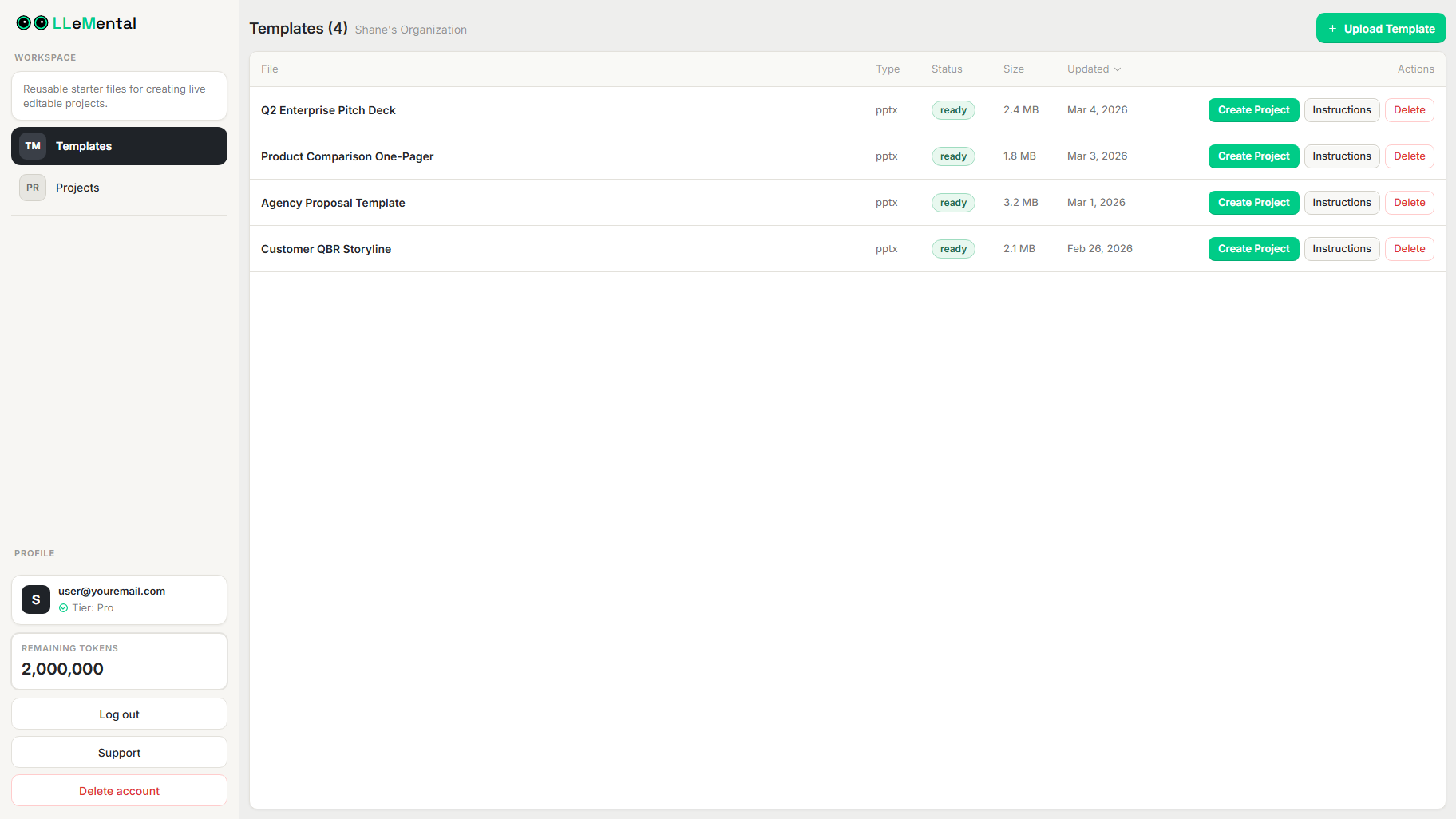
You can optionally add global instructions to guide how content is generated across your presentation No setup required. Templates are saved to your library and can be reused immediately for consistent output across presentations.
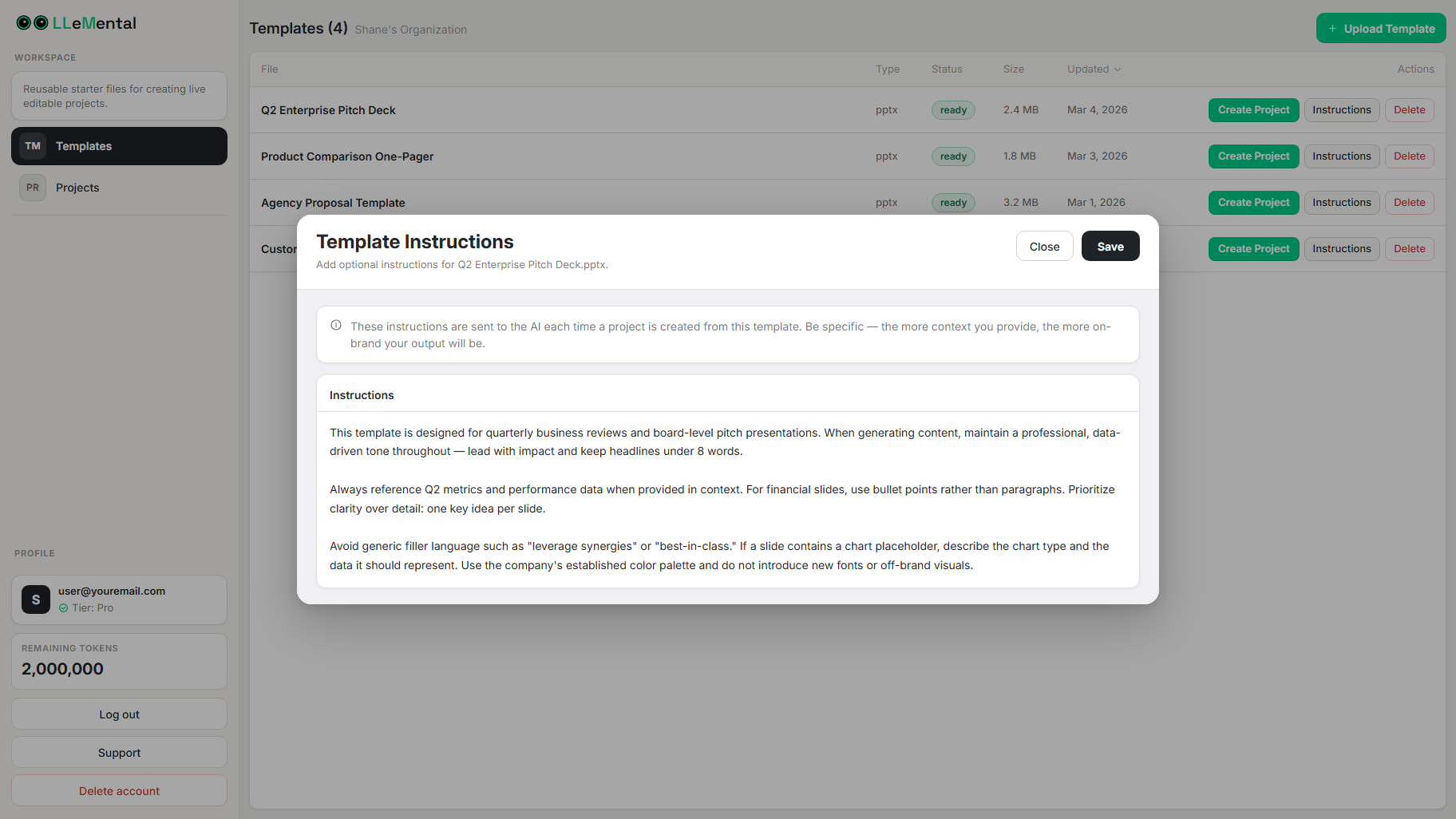
When you generate a presentation, LLeMental processes your source documents — meeting notes, client briefings (TXT, DOCX), research documents (PDF) — and generates content directly within your slides while preserving your template structure. Excel/CSV, website URL import, and image inputs are coming soon. All formatting and design elements remain untouched. The output is a native .pptx file with perfect formatting, exact brand colors, proper fonts, and working animations.
Real Business Results
A digital marketing agency reduced client proposal creation from 4 hours to 5 minutes per project while maintaining their established brand standards that had been tested across 200+ client presentations. The 98% time reduction translated to $38,000 annual labor savings for a team of three account managers, with zero template migration costs since they used existing files.
A financial services firm generating investment proposals discovered that LLeMental’s multi-source processing—combining company research from PDFs, market analysis documents, and client preferences from meeting notes—produced more comprehensive proposals than their manual process while ensuring regulatory disclaimers remained exactly as legal had approved.
Template Preservation Specifics
- Font Preservation: Exact typefaces maintained with proper embedding—if your template uses Helvetica Neue Medium 18pt, outputs use Helvetica Neue Medium 18pt
- Color Accuracy: Pantone codes and hex values preserved exactly—no approximation or shifting
- Layout Fidelity: Spacing, alignment, and positioning maintained to the pixel
- Brand Element Protection: Logos, watermarks, footers, disclaimers remain completely untouched
- Animation Integrity: Transitions and effects work exactly as designed in the original template
Export Quality
LLeMental generates native PowerPoint files, not exports from proprietary formats. The .pptx file that LLeMental creates opens in PowerPoint with zero formatting issues because it was built as a PowerPoint file from the start. No font substitution, no layout shifts, no color changes, no cleanup required.
Best For: Organizations with existing PowerPoint templates they need to preserve—marketing agencies, consulting firms, professional services teams, regulated industries, enterprise organizations with established brand standards.
Pricing: User plan $20/month (500K AI credits/month, up to 5 templates), Plus plan $40/month (2M AI credits/month, unlimited templates), Business custom pricing.
Bottom Line: LLeMental is the only AI presentation tool built specifically around template preservation. If you have existing PowerPoint templates you need to maintain, no other option delivers comparable capability.
Gamma: Best for Starting from Scratch (Not for Template Preservation)
Gamma has earned its position as a market-leading AI presentation generator through genuinely impressive card-based presentation creation that reimagines how slides work. For users starting fresh projects with no template constraints, Gamma delivers beautiful results with remarkable speed.
Template Reality Check
Gamma uses a proprietary card-based presentation system fundamentally different from PowerPoint’s slide architecture. Your existing PowerPoint templates cannot be imported or preserved—using Gamma means rebuilding presentation formats entirely within Gamma’s design system.
This isn’t a minor limitation. Organizations with years of template investment face complete format migration. Your proven layouts, tested structures, and approved designs must be recreated in Gamma’s card system or abandoned entirely.
Export Quality Experience
Gamma offers PowerPoint export, but the conversion process breaks formatting consistently. Gamma’s own documentation acknowledges that gradient headings may render differently or default to single colors in exports, and fonts may not appear as expected unless installed locally.
Testing reveals more extensive issues: text boxes shift position, custom fonts substitute to defaults, carefully chosen colors approximate rather than match exactly, and animations either disappear or require recreation. A 15-slide presentation generated in 90 seconds requires 45-60 minutes of PowerPoint cleanup.
What Gamma Does Exceptionally Well
When template preservation isn’t a requirement, Gamma excels. The card-based format creates modern, visually striking presentations that feel fresh compared to traditional slides. AI-powered content generation produces coherent narratives quickly. The collaborative features enable team editing efficiently.
For startups without established templates, marketing teams building one-off presentations, or anyone creating content primarily for web sharing rather than PowerPoint distribution, Gamma delivers genuine value.
Best For: Teams starting from scratch with no existing templates to preserve, presentations primarily shared via web links rather than PowerPoint files, users who prefer modern card-based formats over traditional slides.
Limitation for Business: Cannot preserve existing PowerPoint templates. Export to PowerPoint breaks formatting. Requires complete template migration to use effectively.
Pricing: Free plan available, Premium $8/month per user, Pro $25/month per user with advanced features.
Beautiful.ai: Smart Templates with Forced Migration
Beautiful.ai pioneered intelligent template systems that automatically adjust layouts as content changes—a genuinely innovative approach to presentation design. The platform’s “smart slides” adapt spacing, resize elements, and maintain visual balance without manual formatting.
The Template Preservation Problem
Beautiful.ai requires using their template system—you cannot import existing PowerPoint templates. Your organization’s carefully crafted presentation formats must be recreated within Beautiful.ai’s design framework, which means rebuilding layouts, approximating brand colors and fonts within their available options, and adapting proven structures to fit their smart slide constraints.
The platform offers brand kit functionality where you can specify company colors and fonts, but this applies only to Beautiful.ai’s templates, not your existing PowerPoint files. You’re still rebuilding templates from scratch, just with some brand consistency guardrails.
Export Compatibility Issues
PowerPoint exports from Beautiful.ai maintain better fidelity than some competitors, but manual cleanup remains necessary. Smart slide features that work beautifully in Beautiful.ai—automated spacing, dynamic layouts, intelligent element positioning—translate poorly to PowerPoint’s static slide structure.
Fonts may substitute if your brand uses typefaces not in Beautiful.ai’s library. Layouts that adapted automatically in Beautiful.ai become fixed in PowerPoint, losing the intelligent adjustment that made them effective. Color matching approximates rather than preserves exact Pantone codes.
When Beautiful.ai Makes Sense
For organizations willing to adopt Beautiful.ai as their primary presentation platform and accept the template migration investment, the smart slide technology delivers genuine efficiency gains. Teams creating multiple presentations weekly benefit from automated layout optimization once templates are rebuilt in the platform.
Best For: Organizations willing to migrate to Beautiful.ai’s template system, teams prioritizing automated design intelligence over template preservation, users creating presentations primarily within Beautiful.ai rather than distributing PowerPoint files.
Limitation for Business: Cannot preserve existing PowerPoint templates. Requires complete template rebuild. Export cleanup needed for PowerPoint compatibility.
Pricing: Pro plan $12/month per user, Team plan $40/month per user with collaboration features.
Plus AI: Closest to Template Preservation (But Still Redesigns)
Plus AI operates as a Google Slides and PowerPoint add-in, giving it native integration advantages that standalone platforms can’t match. The tool works inside the presentation software you already use rather than requiring platform migration—a fundamentally different architecture.
How It Handles Existing Templates
Plus AI can work with existing PowerPoint files since it operates as an add-in within PowerPoint itself. However, the tool doesn’t preserve your template as-is. Instead, it analyzes your content and applies its own AI-generated design and layout choices, effectively redesigning your slides even while working within your PowerPoint file.
You’ll see your brand colors and fonts maintained (because they’re PowerPoint native), but layouts, spacing, element positioning, and content organization may change substantially. Static sections you need to preserve—legal disclaimers, specific footer content, pre-approved messaging—can be altered unless you manually protect them.
Export Quality Advantage
Since Plus AI works within PowerPoint and generates actual PowerPoint slides rather than converting from another format, export quality issues disappear. The file is already a PowerPoint file with native formatting, properly embedded fonts, and working features.
This is Plus AI’s strongest differentiator from standalone platforms—you never face formatting cleanup because you never left PowerPoint’s ecosystem.
Template Preservation Gap
While Plus AI works with PowerPoint files, it doesn’t preserve templates in the sense established organizations require. Your proven layouts get redesigned. Your tested structures get reorganized. Your static content risks modification unless manually protected.
For organizations with templates that must maintain exact formatting—regulatory requirements, brand compliance, proven conversion structures—Plus AI’s redesign approach creates the same problems as complete platform migration, just within PowerPoint’s interface rather than external platforms.
Best For: PowerPoint users who want AI assistance but can accept template redesign, teams without strict brand consistency requirements, organizations comfortable with AI determining layout and design choices.
Limitation for Business: Works in PowerPoint but doesn’t preserve exact templates. Redesigns layouts and structures. Static content may be altered.
Pricing: Free plan available with limited features, Pro plan $20/month per user with advanced AI capabilities.
Canva Magic Design: Design Power with Maximum Migration Cost
Canva dominates general design tools through an enormous asset library, powerful editing capabilities, and broad platform recognition. Magic Design adds AI presentation generation to Canva’s comprehensive design ecosystem.
The Template Migration Reality
Using Canva for PowerPoint presentations means rebuilding everything in Canva’s platform. Your existing templates, refined over years, must be recreated from scratch using Canva’s elements, layouts, and design tools.
For simple presentations, this migration might seem manageable. For organizations with complex branded templates—specific typography hierarchies, precise color systems, custom graphics, regulatory disclosures, tested layouts—the rebuild project becomes substantial.
Canva’s strength is design flexibility, which means nearly infinite options for recreation. This same flexibility means substantial designer time investment to accurately rebuild templates rather than simple format conversion.
Brand Kit vs Template Preservation
Canva offers brand kit functionality where you upload logos, specify colors, and define fonts. This helps maintain consistency when creating new designs in Canva, but it doesn’t preserve existing PowerPoint templates. You’re still rebuilding presentations in Canva’s system, just with brand elements accessible.
Export Quality Challenge
Independent testing by Plus AI found that Canva presentations exported to PowerPoint require significant cleanup work—text boxes shift, formatting changes, and layouts require manual correction. A professionally designed presentation in Canva becomes a formatting repair project when exported to PowerPoint.
When Canva Makes Sense
Organizations adopting Canva as their primary design platform across all visual communication—not just presentations—may justify the migration investment. Teams needing extensive design customization and editing capabilities benefit from Canva’s powerful tools once templates are rebuilt.
Best For: Organizations adopting Canva for comprehensive design needs beyond presentations, teams with substantial design resources for template migration, users prioritizing maximum design flexibility over preservation.
Limitation for Business: Highest template migration cost among tools reviewed. Export quality issues with PowerPoint. Requires complete template rebuild in proprietary platform.
Pricing: Canva Pro $12.99/month per user includes Magic Design, Canva for Teams $30/month per user for 5+ members.
Other AI Presentation Makers
Pitch focuses on team collaboration with real-time co-editing and robust commenting features. Like other standalone platforms, it requires template migration and uses proprietary formatting that doesn’t preserve existing PowerPoint templates. Best for teams prioritizing collaboration over template preservation.
Presentations.AI specializes in data visualization with strong chart generation and interactive element capabilities. Cannot import existing PowerPoint templates. Good for users building data-heavy presentations from scratch but unsuitable for organizations needing template preservation.
Microsoft Copilot integrates directly into PowerPoint as a Microsoft 365 add-in, giving it native access and compatibility advantages. However, the tool requires expensive Microsoft 365 Copilot licenses ($30/month per user on top of Microsoft 365 subscription), and it is more of an editing tool for redesigns rather than content creation within the deck structure. Best for organizations already heavily invested in Microsoft ecosystem who can justify the premium pricing.
Prezi offers unique non-linear, zooming presentation formats that work well for visual storytelling and educational contexts. Completely incompatible with traditional PowerPoint templates—it’s an entirely different presentation paradigm. Cannot preserve existing slide-based templates.
GenPPT takes a research-first approach, emphasizing AI content quality and comprehensive information gathering. Like other standalone platforms, requires complete template rebuilding and doesn’t preserve existing PowerPoint formats.
Template Preservation Comparison: What Actually Works
The table below evaluates tools specifically on criteria that matter for organizations with existing PowerPoint templates—not on generic features that look good in demos but create expensive problems in production.
| Feature | LLeMental | Gamma | Beautiful.ai | Plus AI | Canva |
|---|---|---|---|---|---|
| Use Existing PowerPoint Templates | ✓ Yes | ✗ No | ✗ No | ~ Partial | ✗ No |
| Preserve Exact Formatting | ✓ Yes | ✗ No | ✗ No | ✗ No | ✗ No |
| Native PowerPoint Export | ✓ Yes | ~ Broken | ~ Manual Fix | ✓ Yes | ~ Broken |
| Brand Specification Compliance | ✓ Exact | ~ Close | ~ Close | ~ Modified | ~ Custom |
| Template Migration Cost | $0 | High | High | Medium | High |
| Static Content Protection | ✓ Guaranteed | ✗ None | ✗ None | ~ Manual | ✗ None |
| Multi-Source Data Processing | ✓ Yes | ✗ Limited | ✗ Limited | ✗ Limited | ✗ Limited |
| Reusable Templates | ✓ Yes | ✗ No | ✗ No | ✗ No | ✗ No |
Key Takeaways:
Only LLeMental preserves existing PowerPoint templates without requiring rebuild or format migration. Every other tool marketing itself as the best AI tool to create PowerPoint presentations forces organizations to recreate formats in proprietary systems.
Native PowerPoint export quality varies dramatically. LLeMental and Plus AI (working within PowerPoint) produce perfect exports. Gamma, Beautiful.ai, and Canva require significant manual cleanup.
Template migration costs create hidden expenses that reviews ignore. Rebuilding professional templates costs $15,000-$40,000 plus ongoing dual maintenance when brand guidelines update.
The Real Cost Comparison: Template Preservation vs Migration
Standard pricing comparisons show monthly subscription costs. Real business cost analysis includes the template migration investment that determines actual total cost of ownership.
Traditional AI Tool Total Cost (First Year)
Template Migration Investment:
- Professional redesign and rebuilding: $20,000-$35,000
- Brand guideline adaptation: $3,000-$8,000
- Template testing and refinement: $2,000-$5,000
- Team training on new platform: $1,500-$3,000
- Subtotal: $26,500-$51,000
Ongoing Platform Costs:
- Annual subscription (assuming $25/month per user × 5 users): $1,500
- Maintenance and updates: $500-$1,500
- Subtotal: $2,000-$3,000
Hidden Costs:
- Dual maintenance burden for brand updates: 4-8 hours/quarter at $150-$300/hour = $2,400-$9,600/year
- Lost productivity during 2-3 month transition: $5,000-$12,000
- Risk of reduced conversion from untested formats: Unquantifiable
- Subtotal: $7,400-$21,600
Total First-Year Cost: $35,900-$75,600
LLeMental Template Preservation Approach (First Year)
Template Migration Investment:
- Use existing templates as-is: $0
- No setup required: $0
- Zero brand guideline adaptation needed: $0
- Subtotal: $0
Ongoing Platform Costs:
- Annual subscription (Plus plan $40/month × 5 users): $2,400
- No dual maintenance (single source): $0
- Subtotal: $2,400
Hidden Costs:
- No transition period required: $0
- Proven templates maintain conversion rates: $0
- No format compliance review cycles: $0
- Subtotal: $0
Total First-Year Cost: $2,400
Five-Year Total Cost of Ownership
Traditional AI Platform:
- Year 1: $35,900-$75,600 (includes migration)
- Years 2-5: $9,400-$24,600 per year (subscription + dual maintenance)
- 5-Year Total: $73,500-$174,000
LLeMental Template Preservation:
- Year 1: $2,400 (subscription only)
- Years 2-5: $2,400 per year (subscription only)
- 5-Year Total: $12,000
Cost Difference: $61,500-$162,000 over five years—and this analysis assumes the traditional platform subscription costs the same as LLeMental. Most enterprise AI presentation platforms charge significantly more per user than LLeMental’s $40/month Plus plan pricing.
Beyond Direct Costs: Risk and Opportunity
Template migration forces organizations to abandon proven formats for unproven alternatives. A sales team’s proposal template has been refined through 500+ client engagements. Rebuilding in a new platform means starting validation from zero—which presentations convert prospects? Which layouts guide reader attention effectively? This knowledge loss has real business impact that financial analysis struggles to quantify.
Time to value differs dramatically. Traditional platforms require 2-3 months of template migration before teams can generate first presentations. LLeMental enables presentation generation within hours of uploading existing templates. For organizations responding to RFPs or time-sensitive opportunities, this delay creates competitive disadvantage.
Our comprehensive guide to calculating ROI for agency presentation automation provides detailed frameworks for quantifying both direct costs and opportunity value of different AI presentation approaches.
Making the Right Choice for Your Organization
The “best AI for PowerPoint presentations” depends entirely on your starting point. Organizations without existing templates face different decisions than teams with years of presentation investment.
Choose Template Preservation (LLeMental) If You:
- Have existing PowerPoint templates with proven effectiveness
- Operate in regulated industries requiring compliance-approved formats
- Maintain strict brand guidelines with specific colors, fonts, and layouts
- Create similar document types repeatedly (proposals, reports, pitch decks)
- Need to maintain conversion rates from tested presentation structures
- Cannot justify $20K-$40K template migration costs
- Require exact brand specification compliance (Pantone codes, specific typefaces)
- Want to start generating presentations immediately, not in 2-3 months
Choose From-Scratch Generation (Gamma, Beautiful.ai, Canva) If You:
- Have no existing templates to preserve
- Are building presentation formats from zero
- Prioritize modern design aesthetics over brand continuity
- Share presentations primarily via web links rather than PowerPoint files
- Have design resources to invest in template rebuilding
- Don’t require strict brand compliance
- Value platform design tools over template preservation
Many businesses underestimate the true cost of switching tools until they go through it. Our analysis of why template migration costs more than time breaks down the hidden expenses that don’t show up in subscription comparisons. If you’ve decided template preservation is the right approach, see our step-by-step guide to using AI with your existing PowerPoint templates for practical implementation guidance.
The Question That Determines Everything
Before evaluating features, generation speed, or AI capabilities, answer this: Do you have PowerPoint templates you need to keep using?
If yes, only one platform on this list preserves them. Every other option forces expensive migration that undermines the value proposition of AI automation.
If no, multiple platforms deliver genuine value. Choose based on design flexibility, collaboration features, or platform ecosystem fit.
Try LLeMental’s Template Preservation Approach
See exactly how template preservation works with your actual PowerPoint files. Upload a template you currently use for proposals, presentations, or reports, optionally add instructions, and generate a presentation instantly. Generate a test presentation and verify that formatting, branding, and layouts remain exactly as designed.
See whether preserving your existing templates while adding AI automation delivers the efficiency gains your team needs.
Schedule a Demo to connect with the LLeMental team and see it working with your actual templates.
Explore our pricing options for team collaboration and enterprise features. Need guidance on using your templates with AI? Contact our team for personalized onboarding support.