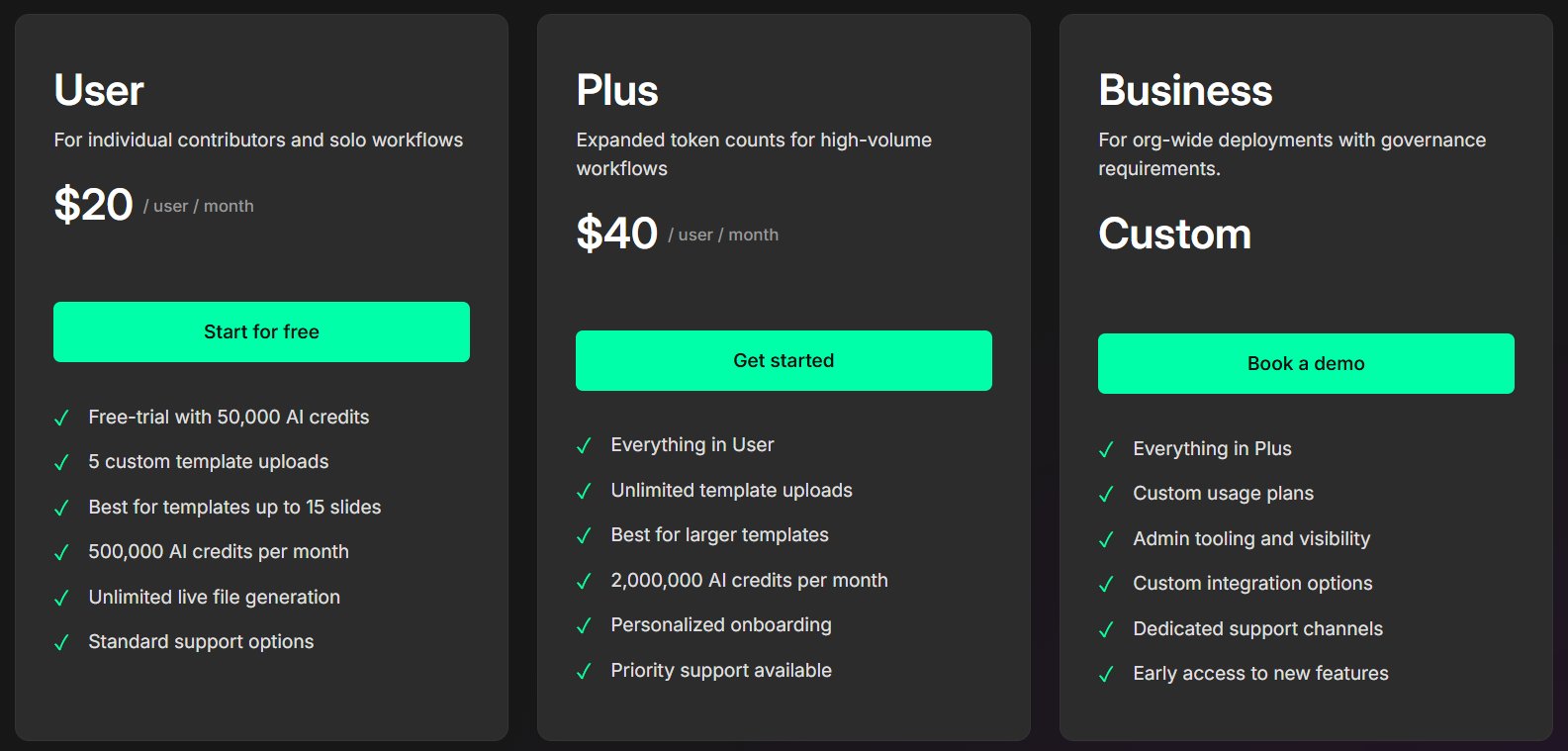
Selecting the right LLeMental plan ensures you have the capacity you need without overpaying for unused resources. This guide helps you evaluate your typical usage patterns and choose the plan that fits your workflow.
Understanding AI Credit Usage
LLeMental uses AI credits to process your presentations—both to analyze your supporting documents and populate the presentations themselves. Like most AI-powered platforms, we measure usage in credits rather than simple “number of presentations” because the actual computational cost varies significantly based on:
- Template complexity: A 10-slide pitch deck requires far less processing than a 100-slide enterprise proposal
- Supporting materials: A single 5-page brief consumes fewer resources than analyzing 30 pages of market research, financial data, and meeting notes
Key Factors to Consider
When evaluating which plan fits your needs, consider these three primary factors:
1. Template Size and Complexity
The size of your presentation templates directly impacts your credit consumption. Consider your typical presentation formats:
Small Templates (5-15 slides)
- Marketing pitch decks
- Sales presentations
- Meeting summaries
- Weekly status reports
- Client proposals
- Investment memos
Medium Templates (15-40 slides)
- Quarterly business reviews
- Comprehensive proposals
- Training materials
- Conference presentations
- Department updates
Large Templates (40-100+ slides)
- Annual strategic plans
- Training & onboarding materials
- Educational workshops
- Detailed research reports
- Annual reports & stakeholder briefings
- Investment proposals
Each configured section in your template—where LLeMental generates custom content—adds to the processing requirements. A 50-slide template where you’re only populating 10 dynamic sections will consume fewer credits than a 30-slide template with 25 dynamic sections.
2. Supporting Materials Volume
The documents you upload to inform your presentations have a significant impact on credit usage. LLeMental analyzes all your supporting materials to extract relevant information and synthesize it into a cohesive narrative.
Light Supporting Materials
- 1-3 documents
- 5-10 total pages
- Examples: Client brief, meeting notes, basic data sheet
Moderate Supporting Materials
- 3-8 documents
- 10-40 total pages
- Examples: Market research report, customer data spreadsheet, brand guidelines, previous campaign results
Heavy Supporting Materials
- 8-15+ documents
- 40-100+ total pages
- Examples: Comprehensive market research, extensive Excel analytics, multiple PDF reports, competitive analysis documents, financial statements
Consider not just the number of files, but their complexity. A 5-sheet Excel file with dense financial data consumes more credits than a 5-page PDF. Excel files with extensive data, lengthy Word documents with detailed research, and lengthy PDFs all increase credit consumption significantly.
3. Monthly Generation Frequency
How often you generate presentations is the final piece of the equation. Consider your typical workflow:
Occasional Use (1-5 generations/month)
- Solo consultants with intermittent projects
- Teams creating monthly reports
- Agencies with a few key clients
Regular Use (6-15 generations/month)
- Active agencies managing multiple clients
- Sales teams with frequent prospect meetings
- Marketing teams running ongoing campaigns
- Consultants with steady client flow
Heavy Use (16-50+ generations/month)
- Large marketing agencies
- Enterprise sales organizations
- Consulting firms with numerous projects
- Investment firms with frequent pitch requirements
Plan Recommendations
User Plan - 500,000 Monthly credits
Best for:
- Solo professionals creating presentations occasionally
- Small teams with straightforward presentation needs
- Projects involving small to medium templates (5-15 slides)
- Simple supporting materials (1-5 documents, 5-10 pages total)
- 5-10 generations per month depending on complexity
Typical use cases:
- Marketing consultant creating 8 client pitch decks monthly (10-15 slides each, light supporting materials)
- Sales professional generating 10 prospect presentations (10-15 slides, meeting notes and product sheets)
- Small agency producing 6 client proposals monthly (15-25 slides, moderate research materials)
The User plan provides ample capacity for professionals who need consistent presentation generation without managing dozens of complex projects simultaneously.
Plus Plan - 2 Million Monthly credits
Best for:
- Growing agencies managing multiple client accounts
- Mid-sized teams with varied presentation needs
- Projects involving medium to large templates (15-50 slides)
- Comprehensive supporting materials (5-15 documents, 10-40 pages)
- 10-15 generations per month depending on complexity
Typical use cases:
- Marketing agency serving 12-15 clients, generating ~15 presentations monthly (mix of sizes and complexity)
- Consulting firm producing detailed client deliverables with extensive research (30-40 slides, comprehensive data analysis)
- Sales organization generating customized enterprise proposals (20-30 slides, extensive product documentation and case studies)
- Investment team creating pitch decks and research reports with substantial financial data
The Plus plan accommodates teams that need to generate presentations frequently, work with larger templates, or regularly process substantial amounts of supporting documentation.
Business - Custom Solutions
Best for:
- Large organizations with high-volume needs
- Multiple teams requiring centralized template management
- Complex integrations with existing systems
- Specialized requirements beyond standard plans
Contact us when:
- You regularly exceed 40 generations per month
- Your templates consistently exceed 50 slides
- You need team-wide template management and collaboration
- You require dedicated support and onboarding
- You need custom API or workflow integrations
- Your use case doesn’t fit standard plan structures
Business plans are tailored to your organization’s specific needs, with custom credit allocations, dedicated account management, and flexible billing arrangements.
Estimating Your Usage
To determine which plan fits your needs, audit your typical monthly workflow:
Step 1: Count Your Projects How many presentations do you typically create each month? Include all client deliverables, internal reports, and sales materials.
Step 2: Assess Template Sizes What’s the average slide count of your presentations? Do you have a few standard formats, or does size vary significantly?
Step 3: Evaluate Supporting Materials For a typical project, how many documents do you reference? How many total pages are you working with? Consider Word documents, PDFs, Excel spreadsheets, and other research materials.
Step 4: Consider Growth Are your presentation needs increasing? It’s often more cost-effective to choose a plan with headroom rather than constantly upgrading.
What Happens If You Exceed Your Plan?
If you approach your monthly credit limit, LLeMental will notify you before you run out. You have several options:
- Upgrade your plan for immediate additional capacity
- Wait until next month when your credits reset
- Optimize your usage by reducing supporting materials or template complexity for less critical projects
- Contact us to discuss a custom solution if you have a one-time spike in needs
There are no overage charges—your account simply cannot generate additional presentations until you upgrade or your plan renews. This prevents unexpected billing surprises.
Pro tip: If you consistently hit 80-90% of your plan limit, consider upgrading proactively. This ensures uninterrupted workflow during busy periods and prevents last-minute scrambling when you need to generate an urgent presentation.
Calculate Your Potential ROI
Once you’ve identified the plan that matches your usage patterns, use our ROI calculator to estimate the time and cost savings LLeMental can deliver to your organization.
The calculator helps you quantify:
- Hours saved per presentation
- Annual time savings across all projects
- Cost savings based on your team’s salary rates
- Return on investment percentage
Most organizations find that LLeMental pays for itself within the first month by eliminating hours of manual presentation building and reformatting.
Still Unsure Which Plan to Choose?
We’re here to help. Our team can review your typical usage patterns and recommend the optimal plan for your needs.
Get personalized guidance:
- Start with User: If you’re uncertain, begin with the User plan. You can always upgrade if you need more capacity.
- Try the free trial: Your trial includes credits to test the platform with your actual templates and workflows.
- Contact our team: Email support@llemental.com to discuss your specific requirements.
We want you on the right plan—not overpaying for unused capacity or constantly hitting limits. Let us help you find the perfect fit.
Next Steps
Ready to choose your plan?
- View current pricing and sign up
- Calculate your ROI
- Learn how to upgrade your account
- Contact us for Enterprise inquiries
Questions about plans, pricing, or which tier is right for you? Reach out at support@llemental.com—we’re happy to help.